
API Rate Limits and Burst Handling: What to Know
Treat rate limiting as a dynamic control system: understand API rate limits, burst handling (Token Bucket), headers, and backoff to keep services stable.

Ever hit a 429 error when using an API? That’s rate limiting in action, a mechanism that controls how many requests you can send to a server in a set timeframe. APIs use this to prevent overload, protect resources, and ensure fair usage. But what happens during sudden traffic spikes? That’s where burst handling comes in. It allows temporary surges in requests without breaking the system.
Key Points:
- Rate Limits: Caps on requests (e.g., GitHub allows 5,000/hour for authenticated users).
- Burst Handling: Temporary flexibility for traffic spikes using methods like the Token Bucket algorithm.
- Why It Matters: Protects servers, ensures stability, and prevents abuse like DDoS attacks.
- Handling Limits: Use headers like
X-RateLimit-Limitand implement strategies like exponential backoff when limits are hit.
Whether you’re managing high-traffic APIs or evaluating CAPTCHA solving API features at scale, understanding these concepts ensures smooth operations and avoids costly downtime.
Rate Limiting Algorithms Explained
Understanding these algorithms is essential when implementing API documentation for high-traffic services.
What Are API Rate Limits?
API rate limits set a cap on how many requests a client can make to a server within a specific time frame. Servers track this activity using identifiers like IP addresses, API keys, or user IDs, and reset the counters after the time window expires. These limits can vary depending on the specific needs of the API or application.
The main goal of rate limiting is to protect the server's resources from being overwhelmed. By managing traffic surges, rate limits help maintain system stability and prevent issues like resource exhaustion. They also act as a defense against malicious activities, such as DoS/DDoS attacks, brute-force attempts, or unauthorized data scraping. Additionally, rate limits promote fairness by ensuring no single client or faulty process consumes an unfair share of resources. For businesses, they can also help control costs by managing usage tied to metered infrastructure.
Types of Rate Limits
There are several ways APIs enforce rate limits, depending on how clients are identified and which resources need protection:
- IP-based limits track requests from a specific IP address. These are effective for public APIs and for mitigating DDoS attacks.
- User-based limits associate quotas with authenticated accounts, making them ideal for SaaS platforms where each user or client has a defined allowance.
- Plan-specific limits adjust based on subscription tiers. For example, free users might be limited to 1,000 requests per day, while enterprise plans allow significantly higher usage.
- Endpoint-specific limits apply stricter caps to resource-intensive operations, such as search or data exports, while offering more lenient limits for less demanding tasks.
For instance, GitHub allows authenticated users to make up to 5,000 requests per hour, while unauthenticated users are limited to just 60 requests per hour. Similarly, Slack enforces method-specific limits, such as 50 requests per minute for some functions and only 20 per minute for others.
Soft vs. Hard Rate Limits
Rate limits can be enforced in different ways:
- Hard limits reject requests outright once the limit is reached, returning a 429 error. This approach is critical for preventing abuse and protecting service reliability.
- Soft limits (also known as throttling) slow down requests instead of blocking them entirely. This allows workflows to continue at a reduced pace, making it useful for handling minor traffic spikes without interrupting service.
Common Rate Limit Metrics
APIs use various metrics to enforce rate limits, depending on the type of traffic they handle:
- Requests Per Second (RPS): Ideal for managing high-frequency, real-time traffic.
- Requests Per Minute (RPM): A standard metric for most web API usage.
- Transactions Per Second (TPS): Common in financial or database-heavy APIs where successful operation completion is key.
- Concurrency Limits: These restrict the number of simultaneous active requests rather than the total number over time.
For example, OpenAI applies a dual-metric system for its GPT-4 model, limiting Tier 1 users to 500 RPM and 30,000 tokens per minute. Shopify enforces a limit of 2 calls per second for standard accounts, while Shopify Plus accounts can make up to 4 calls per second. Generally, low-traffic APIs might allow 60 to 300 requests per minute, while high-traffic APIs can handle 3,000 to 10,000 requests per minute per key.
What Is Burst Handling?
Burst handling is a method that allows an API to temporarily exceed its average rate limit within a set boundary. Think of it as a buffer that absorbs sudden traffic spikes, ensuring legitimate requests aren't immediately blocked. The system distinguishes between two key metrics: the average rate (the normal, long-term request capacity) and the burst capacity (the maximum number of requests it can handle in one go). This mechanism prevents accidental rate limit errors caused by typical multi-endpoint requests. Without burst handling, systems could either reject valid traffic during minor surges or struggle to cope with large-scale attacks.
"If you can't handle bursty traffic, the back-end services can easily be brought down, and the business won't respond appropriately." - API7.ai
How Burst Handling Works
The Token Bucket algorithm is a popular way to implement burst handling. Here's how it works: a "bucket" holds a set number of tokens, and each incoming request consumes one token. If tokens are available, the request is processed immediately - even if this temporarily exceeds the average rate. For instance, in a system with a maximum rate of 5 requests per second, the bucket refills with one token every 0.2 seconds. Some systems, like NGINX, queue extra requests to prevent simultaneous overloads. This approach balances flexibility and control, creating a foundation for further exploration of burst handling techniques.
Benefits of Burst Handling
Burst handling acts as a safeguard during sudden traffic spikes, such as during flash sales, viral posts, or breaking news events. It works like a shock absorber, managing the excess load up to the defined burst capacity, while maintaining stable, predictable throughput over the long term. This method ensures resources aren't overused while still accommodating temporary surges in legitimate traffic. For example, Plausible Analytics sets a default limit of 600 requests per hour per API key but allows higher limits for advanced users upon request.
"Token Bucket offers the best of both worlds, handling bursts while maintaining control." - Dotmock
Next, we'll dive deeper into the algorithms that make burst handling possible.
Rate Limiting and Burst Handling Algorithms
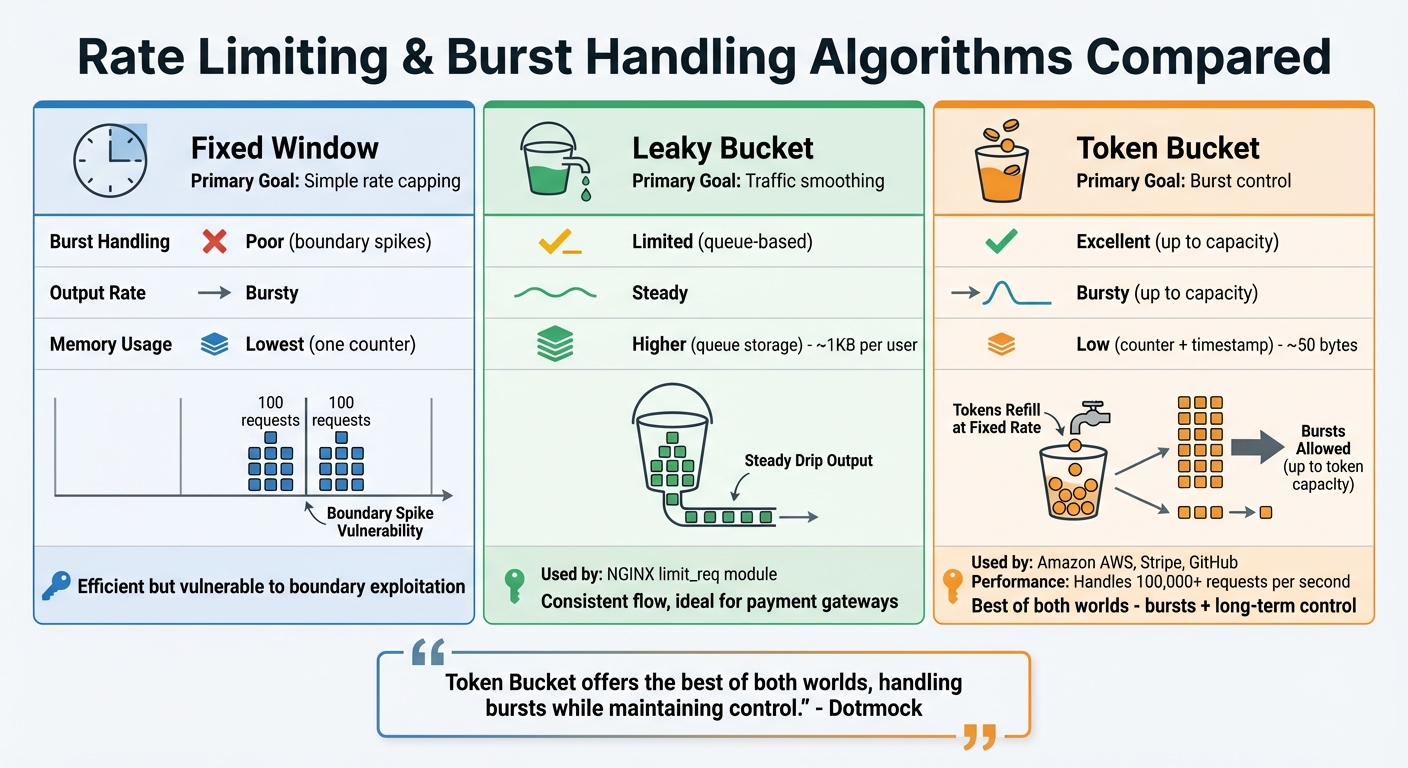
Rate Limiting Algorithms Comparison: Fixed Window vs Leaky Bucket vs Token Bucket
When it comes to managing rate limits and handling bursts in modern APIs, three key algorithms take center stage: Fixed Window, Leaky Bucket, and Token Bucket. Each method has its own strengths and trade-offs, making it important to choose the right one for your API's needs, especially for high-volume tasks like solving CloudFlare Turnstile or ensuring system reliability. For developers looking to optimize these implementations, Peak Solutions offers deep dives into high-speed API scaling.
Fixed Window keeps things straightforward by dividing time into fixed intervals (e.g., one-minute windows) and using a counter that resets at the start of each new interval. While it's extremely efficient in terms of memory usage, it has a major drawback: boundary issues. For instance, if a limit is set at 100 requests per minute, a user could send 100 requests just before the window resets and another 100 right after, effectively doubling the rate limit in a short timeframe. This simplicity comes at the cost of burst control.
With Leaky Bucket, requests are processed at a steady, fixed rate by queuing them in a "bucket". Once the bucket is full, any new requests are simply discarded. This algorithm is great for ensuring a consistent flow of traffic to downstream services, such as payment gateways or webhook systems. It's also implemented by tools like the NGINX limit_req module. However, it requires more memory compared to the Token Bucket approach - around 1KB per user versus just 50 bytes - due to the overhead of managing a queue.
"The leaky-bucket algorithm processes requests at a fixed rate, queuing excess requests... Ideal for traffic shaping." – TeachMeIDEA
The Token Bucket algorithm, on the other hand, is all about flexibility. It allows for short-term bursts while maintaining a consistent long-term average rate. Tokens are added to the bucket at a fixed rate until it reaches its maximum capacity, and each request consumes a token. This setup makes it ideal for public APIs, as it can handle bursts up to the bucket's capacity without sacrificing stability. Platforms like Amazon AWS, Stripe, and GitHub rely on this method. It's highly efficient, requiring only two values to track: the current token count and the timestamp of the last refill. For example, GitHub’s REST API uses this logic to cap requests at 5,000 per hour per user. Impressively, it can manage traffic exceeding 100,000 requests per second.
Here’s a quick comparison of the three algorithms:
| Feature | Fixed Window | Leaky Bucket | Token Bucket |
|---|---|---|---|
| Primary Goal | Simple rate capping | Traffic smoothing | Burst control |
| Burst Handling | Poor (boundary spikes) | Limited (queue-based) | Excellent (up to capacity) |
| Output Rate | Bursty | Steady | Bursty (up to capacity) |
| Memory Usage | Lowest (one counter) | Higher (queue storage) | Low (counter + timestamp) |
How to Handle Rate Limits and Bursts in Captcha-Solving APIs
Configuring Burst Sizes and Monitoring Usage
To avoid bottlenecks, ensure your burst capacity aligns with your backend's processing limits. This synchronization helps maintain smooth operations and prevents overloading your system.
Real-time monitoring is essential. Pay attention to API response headers such as X-RateLimit-Limit, X-RateLimit-Remaining, and X-RateLimit-Reset. These headers provide key details about your current usage and when limits will reset. As Chatwoot aptly states:
"A rate limit that developers don't know about is just a bug waiting to happen."
| Header Name | Purpose |
|---|---|
| X-RateLimit-Limit | Maximum requests allowed in the current time window |
| X-RateLimit-Remaining | Remaining requests before hitting the limit |
| X-RateLimit-Reset | Timestamp (Unix) indicating when the limit will reset |
| Retry-After | Time (in seconds) to wait before retrying a failed request |
By logging these headers, you can identify usage trends and avoid surprises. For distributed systems, centralizing this data through tools like Grafana or Datadog provides a clearer picture of requests per minute, retry attempts, and circuit breaker activations. When a 429 error arises, apply exponential backoff with jitter. This method gradually increases retry intervals while adding random delays to avoid simultaneous retries.
These insights are vital for managing high-volume Captcha-solving efficiently.
Scaling for High-Volume Challenges
Effective scaling strategies depend on understanding the difference between sustained demand and temporary traffic spikes. High-volume Captcha-solving, especially for platforms like CloudFlare Turnstile and WAF challenges, demands fast processing to keep up with incoming requests. Even minor delays can snowball into larger backlogs.
For sustained demand, increasing capacity may be necessary. However, short-term spikes can often be managed with queue systems and techniques like the Token Bucket approach. Additionally, endpoint tiering is crucial - complex Captcha challenges might require stricter concurrency limits than simpler ones. With automated bots accounting for up to 65% of website traffic, your infrastructure must handle both legitimate and automated requests effectively.
Using PeakFO for Captcha-Solving
PeakFO is designed to tackle rate limits and handle bursts with ease. Its architecture ensures sub-second solve times for challenges like CloudFlare Turnstile, CloudFlare WAF, and AWS WAF. This minimizes the time requests spend in a pending state, resulting in higher throughput.
Maintaining a success rate above 99% is critical. Fewer failed attempts mean less wasted quota and fewer retries, which helps manage rate limits more effectively. PeakFO’s retry and error-handling mechanisms further reduce the need for manual intervention.
For real-time monitoring, PeakFO provides a GET /getbalance endpoint. This allows you to track your available balance and set alerts before capacity runs out, similar to using standard rate limit headers. PeakFO also supports unlimited scalability, handling thousands of solves per minute. Its flexible billing options cater to varying traffic patterns. For unpredictable traffic, the pay-per-solve model is ideal, while bulk packages can save up to 50% for consistent high-volume usage. For instance, a 1M CloudFlare Turnstile package costs $500 - breaking down to $0.50 per 1,000 solves. Larger AWS WAF packages can lower costs to $0.40 per 1,000 solves.
| Task Type | Package Size | Total Price | Rate per 1,000 Solves |
|---|---|---|---|
| CloudFlare Turnstile | 1M Solves | $500 | $0.50 |
| CloudFlare Turnstile | 500K Solves | $275 | $0.55 |
| CloudFlare WAF | 1M Solves | $700 | $0.70 |
| AWS WAF (Mobile SDK) | 1M Solves | $400 | $0.40 |
Conclusion
Effectively managing API rate limits and burst handling goes beyond simply setting thresholds - it requires a well-thought-out control system to manage traffic flow. As the Ambassador Team at Gravitee puts it: "Rate limiting is a control plane, not a guardrail - combine global, tenant, user, and endpoint limits for real protection". This layered strategy helps prevent issues like "noisy neighbors" in multi-tenant setups and ensures consistent service availability.
Choosing the right algorithm plays a critical role here. Combining the flexibility of the Token Bucket method with the backend protection offered by the Leaky Bucket algorithm is particularly effective for handling high-volume Captcha-solving scenarios.
But it doesn’t stop at algorithms. Adapting security measures is equally important for boosting API performance. Traditional IP-based rate limiting is no longer sufficient, especially when automated bots make up around 65% of website traffic and attackers leverage distributed proxy networks. Advanced techniques, such as using TLS/HTTP2 fingerprints and analyzing device characteristics, are now essential. These methods have been shown to cut down malicious traffic by up to 99%, all while ensuring legitimate users retain access [39,40,9].
For developers tackling large-scale Captcha challenges, tools like PeakFO simplify the process. It efficiently handles rate limits and burst traffic with sub-second solve times, over 99% success rates, and virtually limitless scalability. Features like real-time monitoring via the /getbalance endpoint and flexible billing options keep operations smooth and reduce the need for manual oversight.
The key takeaway? Rate limiting should be treated as a dynamic system, not a rigid barrier. Standardized headers like X-RateLimit-Remaining and Retry-After help guide client behavior, while categorizing endpoints based on computational cost ensures fair resource allocation across different requests [11,41]. This adaptive approach is at the heart of modern Captcha-solving APIs, balancing efficiency with robust security.
FAQs
Why do APIs return 429 errors?
APIs throw 429 errors when a client surpasses the server's rate limits. These limits are put in place to prevent overloading resources, ensure fair usage among all users, and safeguard the system from abuse or unusually high traffic. Properly managing these limits is crucial for keeping API performance steady and the system reliable.
How do I choose a safe burst size?
When deciding on a safe burst size, think about how much short-term traffic your system can handle without breaking a sweat or hitting rate limits. Begin with a cautious number that matches your usual peak traffic patterns, then tweak it as you go. The goal is to allow genuine traffic spikes without opening the door to misuse, keeping things running smoothly. Keep an eye on your system's performance and adjust the burst size as needed to strike the right balance.
What should my client do after hitting a limit?
When your client encounters rate limits, it's wise to implement a backoff strategy. This means pausing briefly before retrying the request. If the server includes a Retry-After header, make sure to follow its instructions. Doing so helps you stay within the allowed limits and ensures uninterrupted access to the service.