
CAPTCHA API Integration Checklist for Developers
Step-by-step checklist for integrating CAPTCHA-solving APIs: choose providers, secure keys, build requests, handle errors, test in sandbox, run load tests, and monitor performance.

Tired of CAPTCHAs slowing down your automation? Integrating a CAPTCHA-solving API can help you bypass these challenges and keep your workflows running smoothly. Here's what you need to know:
- Why it matters: CAPTCHAs block 43% of web scraping users, causing delays, incomplete data, and higher costs.
- Key features to look for: Sub-second solve times, 99%+ success rates, and compatibility with challenges like Cloudflare Turnstile, AWS WAF, and more.
- Steps to integrate: Identify your CAPTCHA type, choose a reliable API provider, secure your API keys, and test thoroughly in a sandbox environment.
- Cost considerations: Providers like PeakFO offer pay-per-solve pricing starting at $0.40 per 1,000 solves, with discounts for bulk packages.
- Performance tips: Use retry logic for errors, monitor your API usage, and run load tests to ensure scalability.
The bottom line: A well-implemented CAPTCHA API ensures uninterrupted automation while saving time and money. Follow this guide to streamline your integration process.
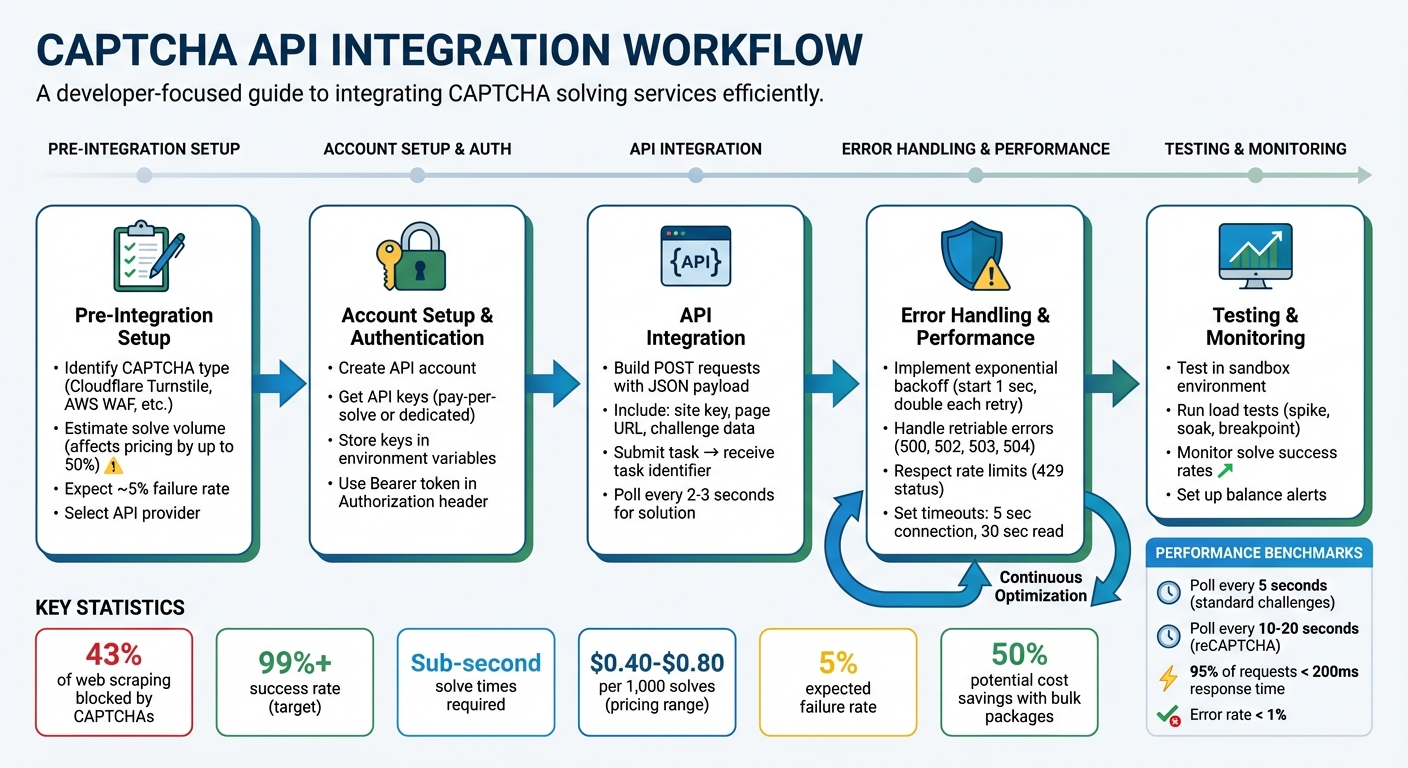
CAPTCHA API Integration Workflow: 5-Step Implementation Guide for Developers
Pre-Integration Setup
Identify Your CAPTCHA Requirements
First, figure out which CAPTCHA challenge is blocking your requests. Is it Cloudflare Turnstile (Interactive or Invisible), Cloudflare WAF's 5-second browser verification, or AWS WAF? Each type requires different strategies and has its own cost implications.
You'll also need to estimate your solve volume. Why? Because higher usage often means lower costs - sometimes by as much as 50%.
Check that your platform is compatible with the CAPTCHA requirements. For example, AWS WAF has different needs for web and mobile SDKs. And if you're working on user-facing apps, make sure your solution can handle sub-second solve times.
"External integrations (proxies, CAPTCHA APIs) introduce delays and potential failure points, so the pipeline must be designed with response wait times and error handling in mind." - Alexander, Developer
Expect a failure rate of about 5% in your automation pipeline. Build retry logic to handle this. Also, if the target sites require specific geolocations or proxies, include those in your planning. Many WAF challenges verify that requests come from expected regions.
Once you've nailed down your requirements, choose a provider that meets them.
Select Your CAPTCHA API Provider
Make sure your chosen provider supports all the CAPTCHA challenges you need to solve. For instance, if you're dealing with AWS WAF Mobile SDK challenges, confirm they support both iOS and Android implementations.
Performance is key. Look for a provider offering sub-second solve times and a success rate above 99% - this ensures your app remains fast and reliable.
Billing flexibility is another factor. A pay-per-solve model is great for testing or variable workloads, while bulk packages can save money for high-volume operations. For example, PeakFO charges $0.80 per 1,000 solves for AWS WAF challenges, but bulk packages can drop that to $0.40 per 1,000 solves.
Ease of integration also matters. Providers offering JSON REST APIs and official SDKs, like Python libraries, can simplify development and speed up deployment. Use trial credits to test the service on your target sites before committing to a larger plan.
Create Your API Account and Get Keys
To get started, register on the Peak.fo website or through their Telegram bot (@jujucodings). New accounts come with trial credits, making it easy to test the integration without paying upfront.
PeakFO offers two types of API keys based on your billing option. Pay-per-solve keys pull from your account balance and never expire, making them perfect for testing or workloads that fluctuate. Dedicated keys are tied to bulk packages, which you can purchase via Telegram. These keys are ideal for high-volume operations and can help you manage usage across projects.
For security, store your API keys in environment variables instead of hardcoding them. Use the /getbalance endpoint to monitor your remaining solves and avoid interruptions.
When it comes to payment, PeakFO accepts BTC, LTC, ETH, USDT (TRC20/ERC20), and TON. After topping up your balance, you can browse packages via the Telegram bot to purchase bulk solves at discounted rates. Each package comes with its own dedicated key, allowing you to allocate solves efficiently across projects or environments.
API Integration Steps
Set Up Secure Authentication
To keep your API key safe, store it in environment variables. For PeakFO, include your API key in the Authorization header using the Bearer token format for every API call. Always use HTTPS to ensure your credentials are encrypted during transmission.
Use the /getbalance endpoint to programmatically check your remaining solves. This keeps you informed about your usage and helps avoid service interruptions when your balance runs low. Setting up automated alerts for low balances - especially in high-volume production environments - is a smart way to stay ahead.
Once secure authentication is in place, you’re ready to start building your API requests.
Build Your API Requests
Send POST requests with the required JSON payload to the correct endpoint. For PeakFO, this involves submitting tasks to the API and receiving a task identifier in return. The process is straightforward but involves two steps: first, submit the CAPTCHA data to get a task identifier; then, use that identifier to poll for the solution.
Your JSON payload should include key details like the site key, page URL, and any challenge-specific data (such as tokens or action names). The site key identifies the CAPTCHA instance, while the page URL provides context for validation.
Although the exact structure of the request body depends on the challenge type, it must always include the task type identifier, site key, and target URL. After submitting the task, poll the API every 2–3 seconds until you either receive the solution or hit a timeout.
Submit Challenge-Specific Tasks
Each CAPTCHA challenge has its own requirements, so tailor your submissions accordingly.
- Cloudflare Turnstile: Provide the site key and page URL. The API handles both interactive and invisible modes.
- Cloudflare WAF Challenges: Include any additional details needed to simulate a browser environment.
- AWS WAF Mobile SDK Challenges: Add platform-specific parameters, such as whether you’re solving for iOS or Android, along with the SDK version and device fingerprint data.
For score-based CAPTCHAs, ensure the action name in the response matches your expected action. This step is crucial to prevent replay attacks. The API will return a JSON object containing the solution token, which you’ll submit to the target website as if a real user had completed the challenge.
Before deploying to production, always test each challenge type in a sandbox environment. This ensures your task submissions are formatted correctly and your responses are handled as expected.
Error Management and Performance
Add Error Handling and Retry Logic
When managing errors, it's crucial to identify which ones warrant retries. Retriable errors - like HTTP status codes 500, 502, 503, and 504 - should trigger retries using an exponential backoff strategy. Start with a 1-second delay and double it with each attempt. For non-retriable errors such as 400 (Bad Request), 401 (Unauthorized), 403 (Forbidden), and 404 (Not Found), retries won't help since these indicate issues with your request structure or credentials.
To avoid overwhelming the system, add jitter to your retry logic. This randomizes retry intervals, preventing simultaneous retries from multiple requests. For rate limit errors (429 Too Many Requests), always respect the Retry-After header before attempting another request. Set clear timeouts to avoid hanging requests - use 5 seconds for connection timeouts and 30 seconds for read timeouts.
In cases where repeated failures occur, implement a circuit breaker pattern. This temporarily stops requests after a failure threshold is reached, protecting your system from cascading issues. For PeakFO-specific errors:
- Use a 60-second retry delay for
ERROR_ZERO_BALANCE. - Apply a minimum 5-second delay for
ERROR_NO_SLOT_AVAILABLE.
| Error Category | HTTP Status Codes | Recommended Action |
|---|---|---|
| Retriable | 500, 502, 503, 504 | Retry using exponential backoff with jitter |
| Rate Limited | 429 | Wait for Retry-After or apply backoff strategy |
| Authentication | 401, 403 | Verify API keys/credentials; avoid automatic retries |
| Client Error | 400, 404 | Correct request syntax or parameters; no retries |
By building a thorough error-handling strategy, you'll minimize disruptions and improve application stability.
Improve API Response Times
Fine-tuning your polling intervals can significantly enhance API performance. For CAPTCHA tasks:
- After submission, poll every 5 seconds for standard challenges.
- For reCAPTCHA tasks, extend the interval to 10–20 seconds initially, then re-poll every 5 seconds if no solution is returned.
To avoid service interruptions, monitor your account balance and set up alerts for low credits. This is especially important for high-volume operations managing thousands of CAPTCHA requests daily. If you're processing at scale, take advantage of bulk packages. For example, PeakFO offers discounts up to 50% on CloudFlare Turnstile packages, with prices ranging from $35 to $500 for 30-day validity.
For smoother production authentication, use Application Default Credentials (ADC). This simplifies setup and reduces errors caused by manual configuration. Additionally, log critical metrics like response times, retry attempts, and error types. Analyzing these logs helps identify bottlenecks and adjust polling intervals based on real-world behavior, ensuring a more efficient workflow.
Testing and Launch
Test in a Sandbox Environment
Start by validating your integration in a controlled setting using test keys provided by your CAPTCHA provider. For example, hCaptcha offers test keys like 10000000-ffff-ffff-ffff-000000000001 for Publisher and Pro accounts, paired with the secret key 0x0000000000000000000000000000000000000000.
When testing locally, avoid using localhost or 127.0.0.1 directly. Many CAPTCHA APIs block these for security reasons. Instead, map a test domain to your local machine (e.g., 127.0.0.1 test.mydomain.com) to bypass CORS restrictions.
To ensure your system correctly handles errors, try submitting invalid tokens (e.g., "FAKE-TOKEN") and confirm it identifies success: false responses and error codes like invalid-input-response. Additionally, mock API responses to always return {success: true} during functional tests for more straightforward validation.
Testing in a sandbox environment not only verifies your integration but also helps refine error handling and logging mechanisms. Once your integration passes these checks, move on to evaluating its performance under heavier loads.
Run Load Tests for High Volume
After functional testing, it's time to confirm your integration can handle real-world traffic. Perform distributed load tests using cloud-based tools rather than relying solely on a developer machine or CI/CD node.
Use a mix of test types to evaluate different scenarios:
- Spike Tests: Simulate sudden traffic surges for short periods (under 30 minutes) to assess autoscaling capabilities.
- Soak Tests: Run for 6–24 hours at 10–20% above normal traffic levels to detect memory leaks or long-term issues.
- Breakpoint Tests: Gradually increase traffic until the system fails to identify capacity limits.
Set clear benchmarks based on Service Level Objectives (SLOs). For instance, aim for 95% of requests to respond in under 200 milliseconds and keep error rates below 1%. While mocked CAPTCHA APIs work well for functional testing, use the actual API or a sandbox endpoint during load tests to measure real-world latency and behavior.
| Test Type | Duration | Primary Goal |
|---|---|---|
| Smoke Test | Minimal | Confirm basic functionality under light load |
| Spike Test | < 30 minutes | Test response to sudden traffic bursts |
| Soak Test | 6–24 hours | Identify long-term issues like memory leaks |
| Breakpoint | Until failure | Determine the system's maximum traffic capacity |
Thorough load testing ensures that your CAPTCHA integration is robust enough to handle high-traffic scenarios without compromising performance.
Post-Deployment Monitoring
Configure Usage Alerts
Once your CAPTCHA integration is live, keeping an eye on its performance is crucial. By tracking metrics like solve success rates, solve times, and balance levels, you can catch potential issues before they escalate. Since most CAPTCHA services cost between $2 and $3 per 1,000 challenges, monitoring your account balance ensures you don’t run out of credits unexpectedly.
Set up alerts for specific error codes in the siteverify response, such as invalid-input-response, expired-input-response, or sitekey-secret-mismatch. These errors often point to integration or security problems. If you’re using Google Cloud Monitoring, configure alerting policies to notify you when metrics like EXPIRED, DUPLICATE, or INVALID tokens see a sudden spike. Such increases might indicate network disruptions or bot activity.
For client-side issues, implement error callbacks in your frontend code. For example, hCaptcha’s error-callback feature allows you to log failures directly into your analytics platform, giving you real-time insights.
| Metric to Monitor | Description | Source of Data |
|---|---|---|
| Solve Success Rate | Percentage of CAPTCHAs successfully solved vs. failed | Provider API / CloudWatch |
| Solve Time | Time taken from task submission to receiving a solution | Internal Logs / Provider API |
| Error Codes | Specific reasons for failures (e.g., expired tokens) | siteverify JSON response |
| Balance Level | Remaining credits in your provider account | Provider Account API |
In addition to real-time alerts, take the time to periodically review your integration. This helps ensure your setup remains secure and adapts to new challenges as they arise.
Review and Update Your Integration
With your alert system in place, schedule quarterly reviews to evaluate API performance, rotate keys, and adjust risk score thresholds as needed. Pay attention to metrics like CLIENT_TYPE_MISSING or MISSING tokens, which can indicate users are running outdated client versions incompatible with your CAPTCHA setup.
If you’re using reCAPTCHA, review the distribution of risk scores regularly. Adjust thresholds (ranging from 0.0 to 1.0) to fine-tune when to block or challenge users. Before making any strict changes, consider running in Audit Mode to ensure your pass-to-fail ratio aligns with your business goals. To improve detection accuracy, annotate cases of fraudulent activity - such as chargebacks or account takeovers - as fraudulent in your system.
Lastly, ensure your primary API domain is accessible. If regional blocks occur, switch to alternatives like www.recaptcha.net to maintain reliability. Don’t forget to update your Content Security Policy (CSP) to include essential domains like https://www.google.com/recaptcha/ and https://www.gstatic.com/recaptcha/.
Conclusion
Integrating a CAPTCHA-solving API doesn't have to be complicated. Start by defining your needs, ensuring secure authentication, and implementing strong request handling. Test thoroughly in a sandbox environment and run load tests to prepare for high traffic. After deployment, keep an eye on usage metrics and periodically review your setup to maintain peak performance.
PeakFO makes this process straightforward by offering sub-second solve times with a 99%+ success rate, thanks to features like automatic retries and error handling. The integration is simple - just a few lines of code using a JSON-based API with a single /solve endpoint.
This streamlined approach delivers clear benefits for high-volume applications. PeakFO can handle thousands of solves per minute without slowing down, offering unlimited scalability. Pricing is transparent, starting at $1.00 per 1,000 solves, or dropping to $0.50 per 1,000 with bulk packages. Plus, you only pay for successful solves.
For tasks like data scraping or enterprise automation, a well-monitored, efficient CAPTCHA integration is crucial. Opting for task-specific packages in production environments can help you save even more. By following these steps, your integration will remain efficient and resilient, aligning with the checklist outlined earlier.
With the right tools and a dependable provider, CAPTCHA challenges become just another hurdle easily overcome in your development workflow.
FAQs
How do I identify what CAPTCHA type is blocking my requests?
To figure out which CAPTCHA is blocking your requests, you’ll need to examine its behavior, look at its appearance, or dig into its parameters. For example, reCAPTCHA v2 typically presents a checkbox or a challenge, while reCAPTCHA v3 works behind the scenes and assigns a score based on user interaction.
You can confirm the CAPTCHA type by using browser developer tools or inspecting the page’s HTML and JavaScript. Once identified, you can choose the right solver or API method to integrate and handle it effectively.
What’s the safest way to store and rotate my CAPTCHA API keys?
To keep CAPTCHA API keys secure, rely on environment variables or key management systems instead of embedding them directly in your source code. When it comes to rotation, make it a habit to regularly update your keys by generating new ones through your API provider and revoking any outdated keys.
Implement access controls to restrict who can use the keys, and limit their application to only the environments where they’re absolutely needed. Additionally, keep an eye on logs to spot any unusual activity that could indicate a security issue. Following these practices helps protect your keys and reduce potential risks.
How can I scale CAPTCHA solving without hitting timeouts or rate limits?
To manage CAPTCHA solving at scale, it's essential to distribute requests wisely. Use multiple API keys or proxies to spread out the load, which helps avoid hitting rate limits. Implement request throttling and retries to handle potential errors or timeouts effectively. Additionally, streamline your workflow to efficiently manage high traffic volumes. Together, these strategies can help ensure smooth operations and prevent disruptions.