
What Is Cloudflare Turnstile and How Does It Work?
An invisible alternative to CAPTCHAs that uses browser checks, ML risk scoring and single-use tokens to block bots while preserving user experience.

Cloudflare Turnstile is a CAPTCHA alternative that verifies users without annoying challenges like identifying objects in images. Instead of traditional puzzles, it uses background JavaScript checks, browser behavior analysis, and machine learning to distinguish humans from bots. This approach enhances user experience by eliminating interruptions while maintaining strong security.
Key Features:
- No user interaction required: Most users are validated in the background.
- Dynamic challenges: Adjusts difficulty based on user risk level.
- Privacy-focused: Does not collect or store personal data.
- Free Managed Mode: Works on any website, even without other Cloudflare services.
- Accessibility: Complies with WCAG 2.1 AA standards for users with disabilities.
How It Works:
- Runs browser-based checks (e.g., proof-of-work, proof-of-space).
- Uses machine learning to adapt challenges based on user behavior.
- Issues single-use tokens valid for 5 minutes to prevent abuse.
Benefits:
- Simplifies user verification without intrusive tests.
- Improves security by blocking bots more effectively than traditional CAPTCHAs.
- Scales easily to handle high traffic, proven during events like Eurovision 2023.
For integration, embed a JavaScript widget on your site and validate tokens server-side using Cloudflare's API. Turnstile is a hassle-free, secure solution for modern websites.
How to use Cloudflare Turnstile!
How Cloudflare Turnstile Works
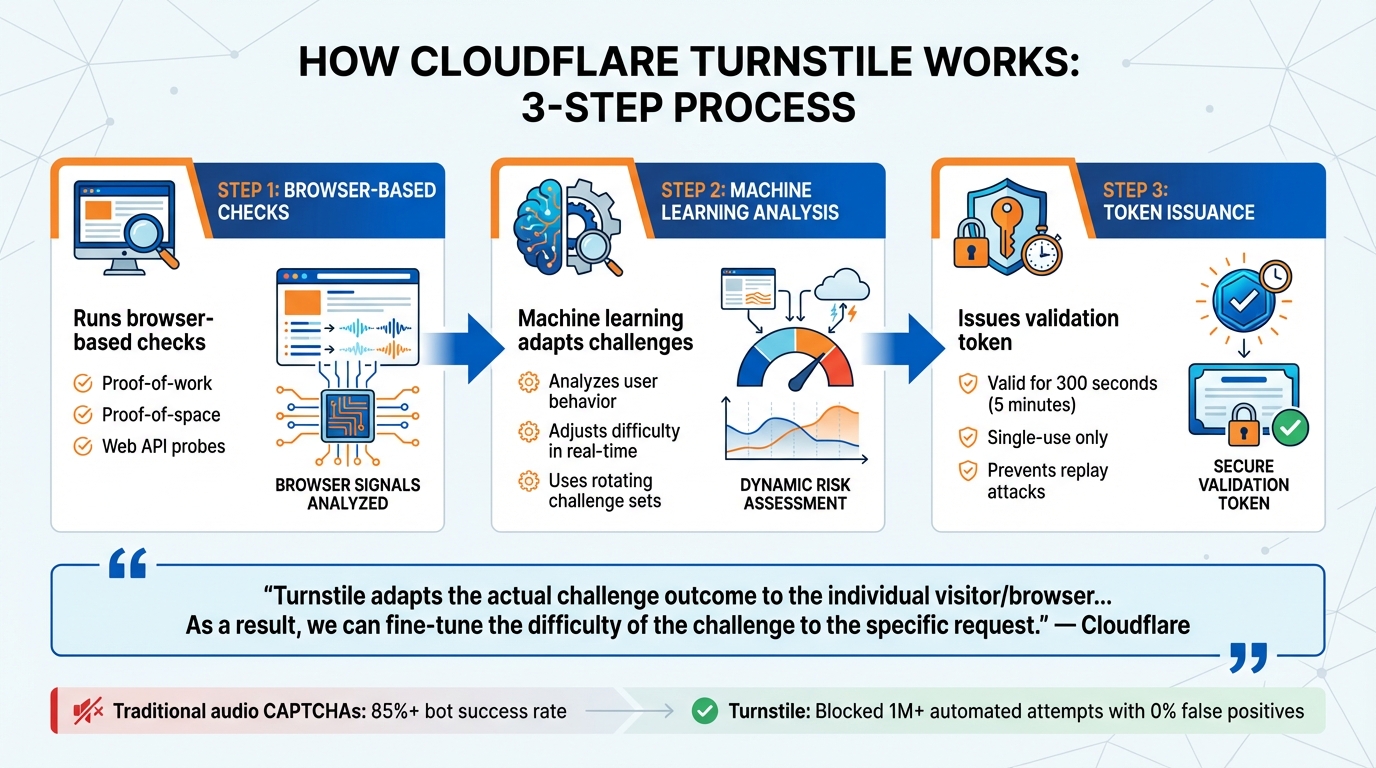
How Cloudflare Turnstile Works: 3-Step Verification Process
Turnstile operates by running non-interactive JavaScript challenges when a page loads. These scripts analyze browser signals using techniques like proof-of-work, proof-of-space, and web API probes. By detecting unique browser behaviors and human interaction patterns, the system identifies real users while filtering out bots. This multi-layered approach lays the groundwork for its advanced functionality.
Machine learning plays a key role in fine-tuning the system. It evaluates data from verified users to adjust the difficulty of challenges in real time. Instead of relying on static tests, Turnstile uses a rotating set of challenges, adapting to each visitor's risk profile dynamically.
"Turnstile adapts the actual challenge outcome to the individual visitor/browser... As a result, we can fine-tune the difficulty of the challenge to the specific request." - Cloudflare
Privacy-Preserving User Validation
Turnstile’s dynamic challenge system is designed to validate users without storing or collecting personal data. By continuously rotating challenges based on telemetry, it becomes extremely difficult for bots to bypass. In Managed mode, which is the default recommendation, visitors suspected of being bots may encounter a simple checkbox. For most users, however, verification happens entirely in the background, unnoticed.
Each verification token issued by Turnstile is valid for 300 seconds (5 minutes) and is single-use only. This ensures that even if a token is intercepted, it cannot be reused to gain unauthorized access.
Dynamic Challenge Selection
Turnstile customizes its challenges based on real-time risk signals. Depending on user behavior and perceived threat level, it may choose between non-interactive background challenges or an interactive checkbox. This risk-based escalation ensures that most legitimate users experience no disruptions.
| Turnstile Widget Mode | Dynamic Selection Behavior | User Experience |
|---|---|---|
| Managed | Automatically switches between non-interactive or checkbox challenges based on risk | Minimal friction for low-risk users |
| Non-Interactive | Only runs background challenges; no interaction required | Users see a loading spinner |
| Invisible | Runs background challenges exclusively with no visible widget | No visible verification elements |
Managed mode uses Cloudflare's dynamic selection capabilities to balance security with user convenience. Turnstile Analytics allows monitoring of solve rates, helping identify unusual traffic patterns if interactive challenges occur more frequently.
Integration with Private Access Tokens
Turnstile also integrates with Private Access Tokens (PATs) to enhance its adaptive challenge system. Available for users on macOS 13, iOS 16, iPadOS 16, and newer versions, PATs validate requests without requiring user interaction. This feature leverages the Privacy Pass protocol, developed with Apple and Google, to create a framework that ensures data remains private.
The system involves four key participants: the Origin (your site or Cloudflare), the Client (user’s browser), the Attester (device manufacturer, like Apple), and the Issuer (Cloudflare). The device manufacturer verifies hardware and software authenticity, offering a more reliable alternative to traditional fingerprinting. Notably, the Attester only knows device details, not the visited website, while Cloudflare knows the website and IP address but not device specifics.
"Private Access Tokens [are] a completely invisible, private way to validate that real users are visiting your site." - Reid Tatoris and Maxime Guerreiro, Cloudflare
Although PATs don’t automatically solve challenges, they provide a cryptographic signal that enables Turnstile to issue easier challenges or skip visible ones entirely. For users on supported systems, this can eliminate nearly 100% of CAPTCHAs. These tokens have a maximum length of 2,048 characters and share the same 300-second validity as standard Turnstile tokens.
Benefits of Implementing Cloudflare Turnstile
Better User Experience
Turnstile takes the hassle out of user verification by replacing intrusive puzzles with seamless, background checks. Instead of forcing users to solve frustrating visual or audio challenges, Turnstile uses non-intrusive JavaScript challenges that run automatically as the page loads. For most users, this means no interruptions at all.
In Managed mode, only visitors flagged as potential bots encounter a simple checkbox, leaving the vast majority of users with a smooth, uninterrupted experience. Turnstile also prioritizes accessibility, eliminating traditional puzzles that can be difficult for individuals with low vision or blindness. It meets WCAG 2.1 AA compliance standards, ensuring inclusivity while maintaining a privacy-first approach that avoids tracking cookies.
Stronger Security and Accuracy
Turnstile leverages advanced browser-based checks and machine learning to set a higher standard for distinguishing humans from bots. By deploying dynamic and varied challenges, it significantly reduces the likelihood of automated systems bypassing its defenses. The system’s machine learning models continuously adapt, improving accuracy by learning from previous interactions.
The effectiveness is clear. On Cloudflare's own signup page, Turnstile blocked over 1 million automated signup attempts in just one month, all without any false positives. Compare that to traditional audio CAPTCHAs, which bots solve correctly in over 85% of cases, and the security advantage becomes obvious.
"Turnstile was just as effective as a CAPTCHA... even without asking users for any interactivity at all." - Cloudflare Blog
Turnstile also integrates server-side validation through the Siteverify API, adding an extra layer of security. Tokens are designed to expire after 300 seconds and can only be used once, effectively preventing replay attacks even if intercepted. These measures ensure reliable protection, even during high-demand scenarios.
Scalability for High-Traffic Applications
Turnstile is built to handle heavy traffic effortlessly. Powered by Cloudflare's Challenge Platform, which protects over 25 million websites globally, it shifts token validation to the edge network, drastically reducing server-side workload. This design ensures consistent performance, even during traffic spikes.
A real-world example: In July 2025, Apollo.io faced a credential-stuffing attack that peaked at 80,000 events per minute. After deploying Turnstile on their login and signup endpoints, they successfully blocked 2.6 million malicious requests with a 0% solve rate. Legitimate users even experienced a 12% improvement in login success rates during the attack. Plus, with Managed mode offering unlimited use at no cost, businesses can scale without worrying about additional expenses.
Steps to Integrate Cloudflare Turnstile
Integrating Turnstile into your site involves three main steps: getting your credentials, embedding the widget, and validating tokens on your server. Before diving in, ensure you have a Cloudflare account and some familiarity with HTML and a server-side language like PHP, Python, or Node.js. Also, your application must run on http:// or https:// protocols - Turnstile won't work with the file:// scheme.
Getting Site and Secret Keys
Start by logging into your Cloudflare account, navigating to the Turnstile section, and creating a new widget. You can automate this process using the Cloudflare API or Terraform if needed. Once the widget is set up, you'll receive two credentials:
- Sitekey: A public key for embedding on your website.
- Secret key: A private key for server-side validation.
It's critical to handle these keys securely. Embed the Sitekey in your HTML, but keep the Secret key strictly server-side. Store it in environment variables or a secure key management system. For added security, configure your widget to work only on specific domains, and use different key pairs for development, staging, and production environments.
Adding the JavaScript Widget
Once you have your keys, it's time to embed the Turnstile widget. First, include the Turnstile script in your HTML header:
<script src="https://challenges.cloudflare.com/turnstile/v0/api.js" async defer></script>
The async and defer attributes ensure the script doesn't block your page from loading.
For implicit rendering, add a div element with the class cf-turnstile and your Sitekey:
<div class="cf-turnstile" data-sitekey="your-sitekey-here"></div>
This setup automatically renders the Turnstile widget on page load and inserts a hidden input field named cf-turnstile-response, which holds the validation token.
If you're working on a Single-Page Application or need more control, go for explicit rendering. In this case, load the script with ?render=explicit and use the following JavaScript to render the widget manually:
turnstile.render('#container', { sitekey: 'your-key' });
Cloudflare recommends using Managed mode, which dynamically adjusts challenge difficulty based on visitor risk. Most legitimate users won't even notice the widget.
Server-Side Validation
After setting up the client side, you'll need to validate the token on your server. When a user submits a form, retrieve the cf-turnstile-response token and send it to your backend. Your server must then make a POST request to the following endpoint:
https://challenges.cloudflare.com/turnstile/v0/siteverify
Include two required parameters in the request:
- Your Secret key
- The token from the form
The server response will be in JSON format. Look for "success": true before processing the user's request. Keep in mind that tokens expire after 300 seconds and can only be used once. If a user stays on your page longer than five minutes, use the expired-callback to refresh the widget automatically.
Automating Turnstile Challenges with PeakFO
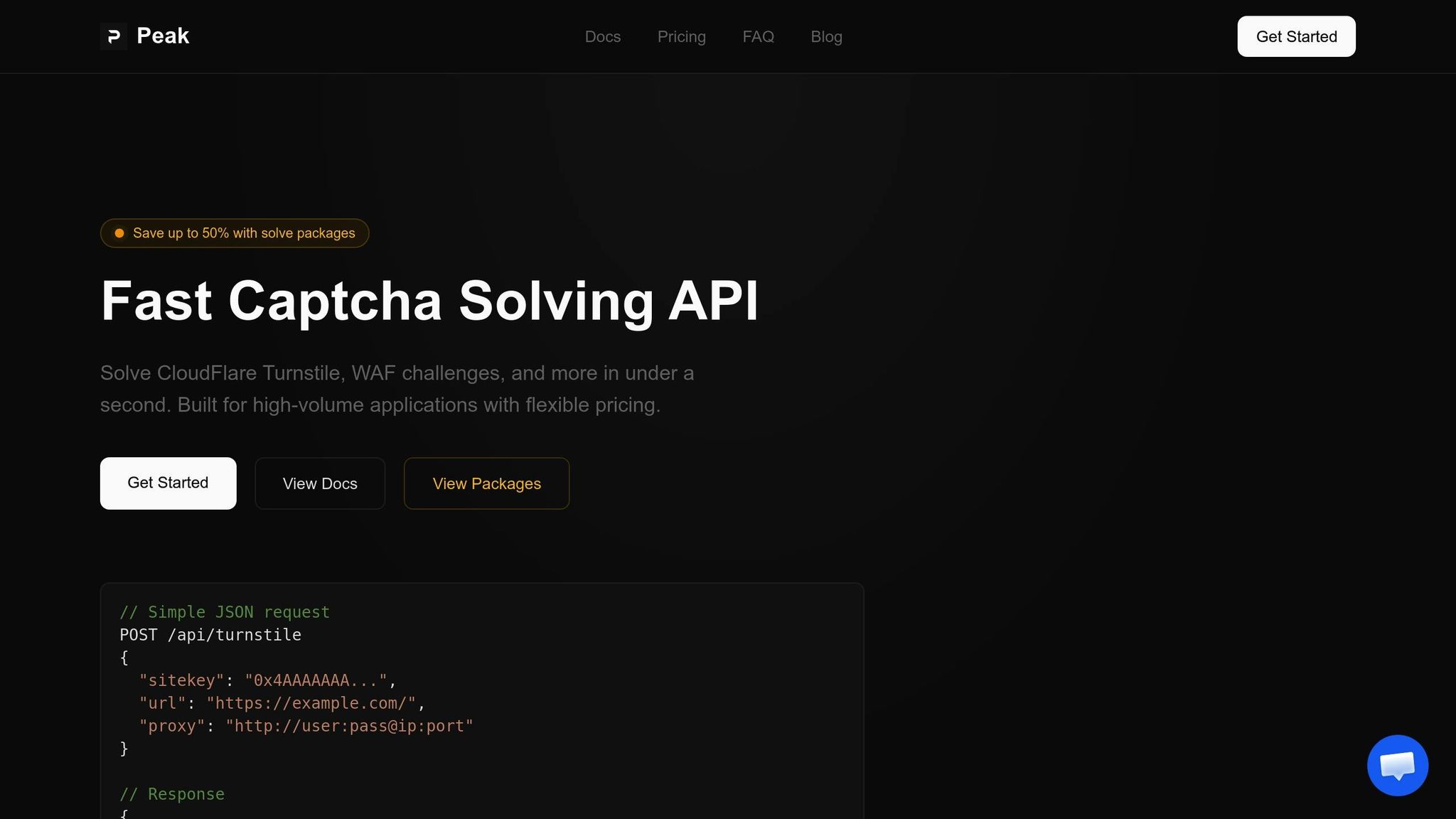
PeakFO takes the hassle out of large-scale Turnstile automation. By building on standard Turnstile integration, it streamlines the process of solving Cloudflare Turnstile challenges. Instead of manually handling the widget and validation flow, you can simply make a single request and receive a valid token in return.
PeakFO API Features
The PeakFO API is designed for speed and reliability, solving challenges in under 1 second on average with a success rate exceeding 99%. It supports various Turnstile widget types - Interactive, Managed, and Invisible - alongside challenges from Cloudflare WAF and AWS WAF. The system is built to handle thousands of solves per minute, ensuring scalability. To top it off, robust error handling and automatic retries enhance reliability, making it a solid choice for automation at scale.
Pricing and Plans for Turnstile Automation
PeakFO offers a flexible pricing structure tailored to different usage levels. Whether you need occasional solves or plan to automate at scale, there’s an option for you. The pay-per-solve model is ideal for occasional use, while bulk packages can save you up to 50% on costs. For example:
- Smaller packages start at $35.
- 500,000 solves cost $275 (around $0.55 per 1,000 solves).
- 1,000,000 solves are priced at $500 (just $0.50 per 1,000 solves).
Challenges for Cloudflare WAF and AWS WAF are priced separately at $0.70 and $0.40 per 1,000 solves, respectively.
Integration Steps with PeakFO
Getting started with PeakFO is straightforward. Here’s how:
-
Get Your API Key: Log in to the PeakFO dashboard and retrieve your API key. Include it in the
X-Api-Keyheader for all requests. -
Check Your Balance: Before running high-volume tasks, verify your balance by sending a
GETrequest tohttps://api.peak.fo/getbalance. -
Solve Challenges: To solve a Turnstile challenge, send a
POSTrequest tohttps://api.peak.fo/solvewith a JSON body containing:task: Set this to "turnstile".sitekey: The site’s Turnstile key.url: The full URL of the page.proxy(optional): Include in the formathttp://user:pass@ip:port.
The API will return a JSON response like this:
{"success": true, "data": { "token": "0.xxxxx..." }}
Extract the token from the response and submit it to the target website, typically in the cf-turnstile-response hidden input field. Be sure to submit the token promptly for it to remain valid.
Use Cases for Automated Turnstile Solving
Automated Turnstile solving tackles operational challenges across various business scenarios, removing manual obstacles in workflows that handle high volumes. Each scenario requires a specific automation strategy to address its unique demands.
Web Automation and Bots
One key application is end-to-end testing. QA and development teams often encounter security measures, like Turnstile's Managed mode, which may display an interactive checkbox when suspicious activity is detected. Automated solving bypasses these hurdles, allowing test scripts to execute without interruptions.
Another area that benefits is data scraping and bot management. Turnstile uses browser behavior and human interaction patterns to identify bots. Since tokens are time-sensitive, scripts must continuously fetch new tokens for every action. Without automation, managing this process manually would be nearly impossible.
Managing High-Volume Traffic
Turnstile has shown its reliability during events that generate massive traffic surges.
Businesses handling high-traffic pages - like login forms, contact pages, or newsletter signups - rely on automation to keep workflows uninterrupted. For example, tasks such as data synchronization or migration often face delays due to token expiration. Automation ensures these processes remain seamless, even during high-pressure periods with large submission volumes.
Simplifying Online Forms and Applications
Automation also plays a crucial role in improving form-based interactions. For Single Page Applications (SPAs) that use explicit rendering, managing the widget lifecycle is critical. Automated solving ensures tokens are always available when needed, enabling workflows to proceed without delays.
Additionally, bulk data entry operations require fresh tokens for every submission. Since tokens are single-use and expire quickly, manual handling simply can't keep up with the scale of these tasks. Automation becomes essential for maintaining efficiency in such large-scale operations.
Conclusion
Cloudflare Turnstile changes the game in user validation by replacing traditional CAPTCHAs with invisible browser challenges. This approach eliminates the frustration of abandoned puzzles (which occur at a rate of about 15%) while ensuring robust security without the hassle of visual tests.
The service provides three widget modes - Managed, Non-Interactive, and Invisible - giving developers flexible options to balance security and user experience.
Setting it up is simple: embed the client-side widget and validate tokens server-side using the Siteverify API. While the process is straightforward, server-side validation is essential to avoid vulnerabilities. Tokens are designed for single use and expire after 300 seconds.
For businesses handling high traffic or bulk operations, PeakFO offers automation tools to simplify Turnstile challenge management. Whether it's end-to-end testing, data migrations, or processing large-scale form submissions, their automation ensures workflows remain smooth, delivering sub-second solve times with a 99%+ success rate.
FAQs
Will Turnstile work if a user blocks JavaScript?
Turnstile relies on small, non-interactive JavaScript challenges to gather information about a visitor's environment. If JavaScript is blocked or disabled, these signals can't be collected, which may interfere with Turnstile's ability to validate users properly.
How do I handle Turnstile tokens expiring during long forms?
Turnstile tokens are only valid for five minutes, so it’s crucial to validate them within that timeframe. If a token expires, users will need to complete the challenge again to generate a fresh one. To keep things running smoothly, consider adding a system that detects when a token has expired. This way, users can be prompted to re-validate without unnecessary interruptions, maintaining both security and functionality.
Can I use Turnstile on multiple domains with one sitekey?
Yes, Turnstile allows you to use a single sitekey across multiple domains. This simplifies management and integration while ensuring security and proper functionality remain intact.