
Geolocation Proxies for CloudFlare Challenges
Residential and mobile geolocation proxies, matched browser metadata, sticky sessions, and CAPTCHA solvers reduce CloudFlare blocks and keep sessions intact.

CloudFlare protects millions of websites with advanced security systems, blocking 50 billion bot requests daily. For automation tasks, this creates significant barriers. Geolocation proxies are a key solution, offering IPs that align with your target region, ensuring consistency across your digital footprint. Here's what you need to know:
- CloudFlare Challenges: Security measures like Turnstile CAPTCHA, WAF, and machine learning-based detection analyze IP reputation, browser settings, geolocation, and more.
- Why Proxies Help: Residential and mobile proxies provide trusted IPs from ISPs or carriers, reducing detection risks. Mobile proxies, with a 92–97% success rate, outperform residential proxies (40–65%) and datacenter proxies (<15%).
- Key Strategies: Use proxies that match your browser's timezone, language, and settings. Maintain the same proxy for session consistency to avoid detection.
- Cost Efficiency: Mobile proxies may cost more per GB but save money by reducing CAPTCHA challenges and failed requests.
Geolocation proxies, combined with CAPTCHA-solving API features, offer a practical way to navigate CloudFlare's defenses while maintaining session integrity. For high-security tasks, mobile proxies remain the most effective option.
How to Bypass Cloudflare 403 Forbidden Error (4 Easy Methods)
Why Geolocation Matching Matters for CAPTCHA Bypassing
CloudFlare uses a sophisticated system to verify the authenticity of IP addresses by cross-checking multiple data points. At the heart of this system is their v8 machine learning model, which processes over 46 million HTTP requests per second in real time. It evaluates factors like the geographic location of an IP address, the browser's timezone, and system language. Any mismatch between these details raises immediate red flags .
This process isn’t just about checking a couple of details. CloudFlare digs deep, analyzing network latency to detect proxy routing, looking for WebRTC leaks that might expose the real IP address, and even examining the Time to Live (TTL) of packets . For instance, if an IP claims to be in the U.S. but routes through Europe, it’s almost certain to get flagged.
The scale of detection is staggering. CloudFlare's v8 model identifies over 17 million unique IPs involved in residential proxy attacks every hour . In one notable case, the system correctly flagged 95% of requests from a distributed residential proxy attack aimed at a voucher redemption endpoint. These numbers highlight just how effective the system is at spotting inconsistencies.
How CloudFlare's Detection Systems Use Geolocation
CloudFlare's detection system operates across multiple layers, with geolocation data playing a role in nearly all of them. The analysis begins even before the HTTP request is fully processed. During the TLS handshake, the system checks whether the cipher suites and extension ordering align with the declared User-Agent.
Once the connection is established, the system compares the IP's geolocation with browser-reported details like timezone, language, and system settings. Any mismatch triggers a "consistency violation". For example, if someone uses a German IP but has their system language set to en-US and their timezone to America/New_York, it’s flagged as suspicious.
The system also looks at the Autonomous System Number (ASN), which identifies the network an IP belongs to. Datacenter IPs - like those from AWS or DigitalOcean - are scrutinized more heavily, while residential IPs from ISPs like Comcast or Verizon are seen as more trustworthy.
Another critical layer is network latency. CloudFlare measures the latency of a connection and compares it to expected values for the claimed location . If the latency doesn’t match typical patterns for a direct connection, the system takes note.
"If your IP address shows a location in Germany, but the browser's time zone is set to Moscow - this is a red flag." - ProxyCove
CloudFlare also evaluates regional reputation. Using proxies from regions far removed from the target site’s audience - like deploying Asian proxies for a U.S.-focused site - raises suspicion and makes CAPTCHA challenges more likely. CloudFlare even maintains its own egress IP pools in hundreds of cities worldwide to ensure precise geolocation for its services, expecting the same precision from legitimate users.
| Detection Layer | What CloudFlare Analyzes | Risk Level |
|---|---|---|
| TLS Fingerprint | Cipher suites, extensions, JA3/JA4 hashes | High |
| IP Reputation | Datacenter affiliation, abuse history | Medium |
| JavaScript Challenge | Timezone, canvas/WebGL fingerprint, plugins | High |
| Behavioral Analysis | Request patterns, mouse movements, timing | Medium |
These multi-layered checks make precise geolocation matching critical for anyone trying to bypass CloudFlare Turnstile and other CAPTCHA systems.
Why Residential Proxies Work Better for Geolocation Matching
Understanding these detection techniques reveals why residential proxies outperform datacenter proxies. Residential proxies use IP addresses assigned by ISPs to real households, making them appear indistinguishable from regular user traffic .
Residential proxies boast success rates of 85–95%, far outpacing the 20–40% seen with datacenter proxies . Mobile proxies, which route through carrier networks, have shown even higher success rates of 92–97%, while datacenter proxies have plummeted below 15% in effectiveness as of early 2026.
The key advantage lies in authenticity. When CloudFlare checks a residential IP against its reputation databases, it sees an address tied to a real ISP customer. These IPs are considered trustworthy because they’re associated with actual consumer devices, unlike datacenter IPs, which are often flagged due to their ASN and history of abuse .
Residential proxies also allow for perfect metadata alignment. Because the IP originates from a specific location, users can synchronize their browser settings - timezone, language, and locale - to match the IP’s geolocation seamlessly. For example, using a residential IP from Chicago means you can set your timezone to America/Chicago, language to en-US, and locale to match without triggering any inconsistencies.
"The fundamental difference lies in authenticity: residential proxies use real homeowner IP addresses for maximum legitimacy, while datacenter proxies offer speed and cost-effectiveness but face declining success rates." - Jason Grad, Co-founder, Massive
There’s also a practical reason why CloudFlare is less aggressive with residential IPs: blocking them can have unintended consequences. Many mobile networks use Carrier-Grade NAT (CGNAT), where thousands of users share a single IP address. Blocking such an IP could inadvertently lock out thousands of legitimate users, creating headaches for CloudFlare’s clients.
| Feature | Residential Proxies | Datacenter Proxies |
|---|---|---|
| IP Source | Real homeowner ISP-assigned IPs | Commercial server farms |
| Success Rate | 85–95% | 20–40% |
| Detection Risk | Very Low (appears as real user) | High (easily identified patterns) |
| Geo-Targeting | Precise (City/State/ASN level) | Limited (Country or DC location only) |
Since 2020, the effectiveness of datacenter proxies for scraping and automation has dropped by 90%, while the use of residential proxies has surged. As detection systems grow more advanced, this gap will only widen, making precise geolocation matching a necessity for automated solutions. For those implementing these tools, understanding supported proxies and integration requirements is the next step.
Choosing the Right Proxy Type for CloudFlare Challenges
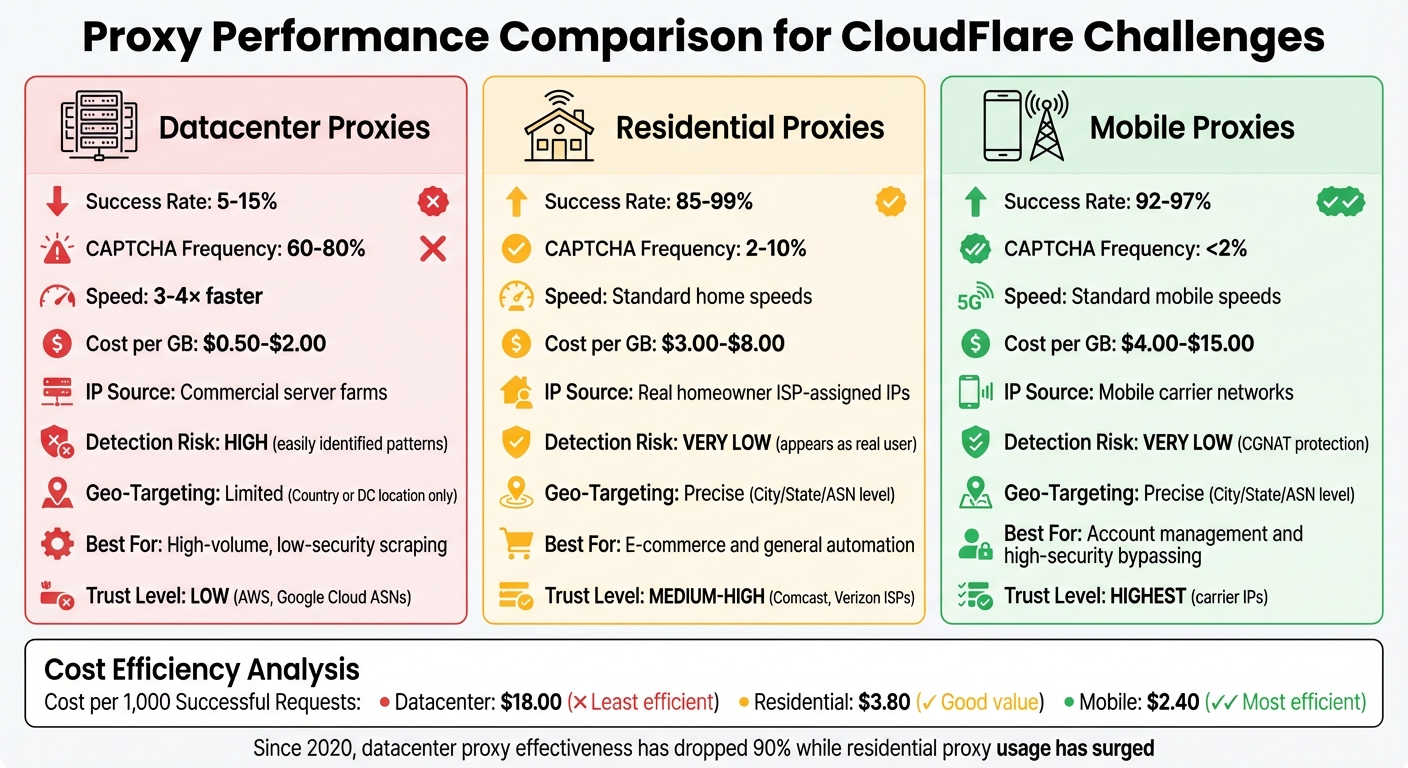
CloudFlare Proxy Types Comparison: Success Rates and Cost Efficiency
When dealing with CloudFlare challenges, picking the right proxy type can significantly affect both costs and success rates. For example, a datacenter proxy priced at $2.00 per GB with only a 10% success rate may seem affordable, but it wastes bandwidth on failed attempts. On the other hand, a mobile proxy costing $10.00 per GB but with a 95% success rate ends up being much more efficient. If you calculate the cost per 1,000 successful requests, it comes out to roughly $18.00 for datacenter proxies, compared to $3.80 for residential proxies and $2.40 for mobile proxies.
CloudFlare also evaluates proxies based on ASN trust scores. Datacenter IPs, such as those from AWS or Google Cloud, often receive low trust scores. Residential ISPs like Comcast or Verizon rank higher, while mobile carriers enjoy the highest trust levels. Mobile proxies are particularly effective because CloudFlare hesitates to block carrier IPs, as doing so could disrupt service for thousands of legitimate users. This combination of cost-effectiveness and trust plays a key role in choosing proxies that can bypass CloudFlare challenges while maintaining accurate geolocation targeting.
Residential Proxies vs. Datacenter Proxies
Residential and datacenter proxies offer distinct advantages, depending on the task. Residential proxies excel in bypassing security, while datacenter proxies prioritize speed.
Datacenter proxies are 3–4× faster than residential proxies, thanks to their enterprise-grade bandwidth. They’re ideal for tasks like public data scraping or accessing low-security websites. However, these proxies struggle with CloudFlare-protected sites, triggering CAPTCHAs in 60–80% of cases.
Residential proxies, in contrast, pass CloudFlare checks 85–99% of the time. Their IPs are spread across millions of home networks, making them harder for CloudFlare to block en masse. This reduces CAPTCHA frequency to just 2–10%, a stark improvement over datacenter proxies.
Here’s a quick comparison of the main proxy types:
| Feature | Datacenter Proxies | Residential Proxies | Mobile Proxies |
|---|---|---|---|
| Success Rate (CloudFlare) | 5–15% | 85–99% | 92–97% |
| CAPTCHA Frequency | 60–80% | 2–10% | <2% |
| Speed | 3–4× faster | Standard home speeds | Standard mobile speeds |
| Cost per GB | $0.50–$2.00 | $3.00–$8.00 | $4.00–$15.00 |
| Best For | High-volume, low-security scraping | E-commerce and general automation | Account management and high-security bypassing |
For cost-conscious operations, a hybrid strategy can be effective. Use datacenter proxies for low-risk tasks, and switch to residential or mobile proxies when encountering blocks. For sites with aggressive bot detection, like those using CloudFlare Turnstile, residential and mobile proxies remain the most dependable options.
Setting Up Geolocation Proxies in Automation Tools
When integrating geolocation proxies into automation tools, precision is key to avoiding detection by CloudFlare. The setup process differs between Playwright and Puppeteer. With Playwright, you can configure proxies at the browser launch or context level using a proxy object. Puppeteer, on the other hand, requires proxies to be set up through the --proxy-server argument within the args array.
It's crucial to align your browser's metadata with the proxy's location. For example, if your proxy IP is based in New York but your browser's timezone is set to Los Angeles, CloudFlare will flag this mismatch. As noted by BrowserStack:
"If your proxy IP is in New York but your browser timezone says Los Angeles, Cloudflare will notice. Always match your geolocation settings with your proxy location."
To avoid such discrepancies, configure settings like timezoneId, locale, and geolocation to match the proxy's location. For instance, if you're using a German residential proxy, set the locale to de-DE and the timezone to Europe/Berlin. Additionally, enable geolocation permissions in the browser context to ensure location data verification passes smoothly. These adjustments help maintain a consistent digital fingerprint, which is essential for bypassing CloudFlare's detection systems. Fine-tuning these settings becomes even more critical when implementing proxy rotation strategies. You can find more automation tutorials and tips on scaling these solutions efficiently.
Proxy Rotation and Sticky Sessions
Once the proxies are set up, managing session rotation effectively is the next step. Common rotation methods include:
- Round-Robin: Distributes requests evenly across multiple proxies.
- Request-Based: Switches proxies after a fixed number of requests, such as 100.
- Time-Based: Rotates proxies every 5–10 minutes.
These rotation techniques can significantly improve success rates.
For workflows involving multiple steps, like logging in or completing a checkout process, sticky sessions are essential. Sticky sessions ensure that the same IP address is maintained for the duration of a specific user journey. This is often achieved by appending a unique session identifier to the proxy username, such as user-session-123. This approach helps retain CloudFlare's clearance cookies like cf_clearance and __cf_bm, which are critical for maintaining a "human" status during subsequent requests.
In Playwright, creating a new browserContext for each proxy or session helps isolate cookies and local storage between identities. Puppeteer, however, requires launching new browser instances for each IP rotation. As highlighted in Apify's documentation:
"To rotate through multiple proxies, you must retire a browser instance then create a new one to continue automating with a new proxy [in Puppeteer]."
Configuring Geolocation Settings in Automation Scripts
Configuring geolocation settings in automation scripts involves slight differences between Playwright and Puppeteer. Here's a breakdown of key features:
| Feature | Playwright | Puppeteer |
|---|---|---|
| Proxy Setup | proxy option in launch or newContext |
--proxy-server flag in args |
| Authentication | Included in the proxy object |
Handled via page.authenticate() |
| Geolocation | geolocation and timezoneId options |
Requires page.setGeolocation() and emulateTimezone() |
| Contexts | Supports multiple contexts with different proxies | New browser instances for IP rotation |
In Puppeteer, proxy credentials cannot be passed directly in launch arguments. Instead, use page.authenticate({ username, password }) before navigating to your target URL. To further reduce automation detection, consider using playwright-extra or the puppeteer-extra-plugin-stealth plugin, which hides automation indicators like navigator.webdriver.
Finally, mimic human-like behavior to avoid detection. This includes random delays of 1–3 seconds between actions, realistic mouse movements, and typing speeds of 50–150ms per character. Avoid running automation in headless: true mode, as it is more easily detected by CloudFlare. Instead, use headless: false or the "new" headless mode for better results.
Combining CAPTCHA Solvers with Geolocation Proxies
Geolocation proxies are a smart way to reduce CAPTCHA challenges, managing 80–90% of requests smoothly. However, some challenges still slip through. For example, CloudFlare's cf_clearance cookie ties itself to the IP address used during the solving process, meaning the same IP must handle all follow-up requests to maintain session integrity. When these challenges arise, having a fast and reliable CAPTCHA solver becomes crucial.
To address this, pair high-quality geolocation proxies with a CAPTCHA solver like PeakFO. These proxies act as your main defense, bypassing most challenges without triggering CAPTCHAs. When a challenge does occur, PeakFO takes over, keeping costs low and maintaining success rates even with large-scale operations.
PeakFO Features for CAPTCHA Solving
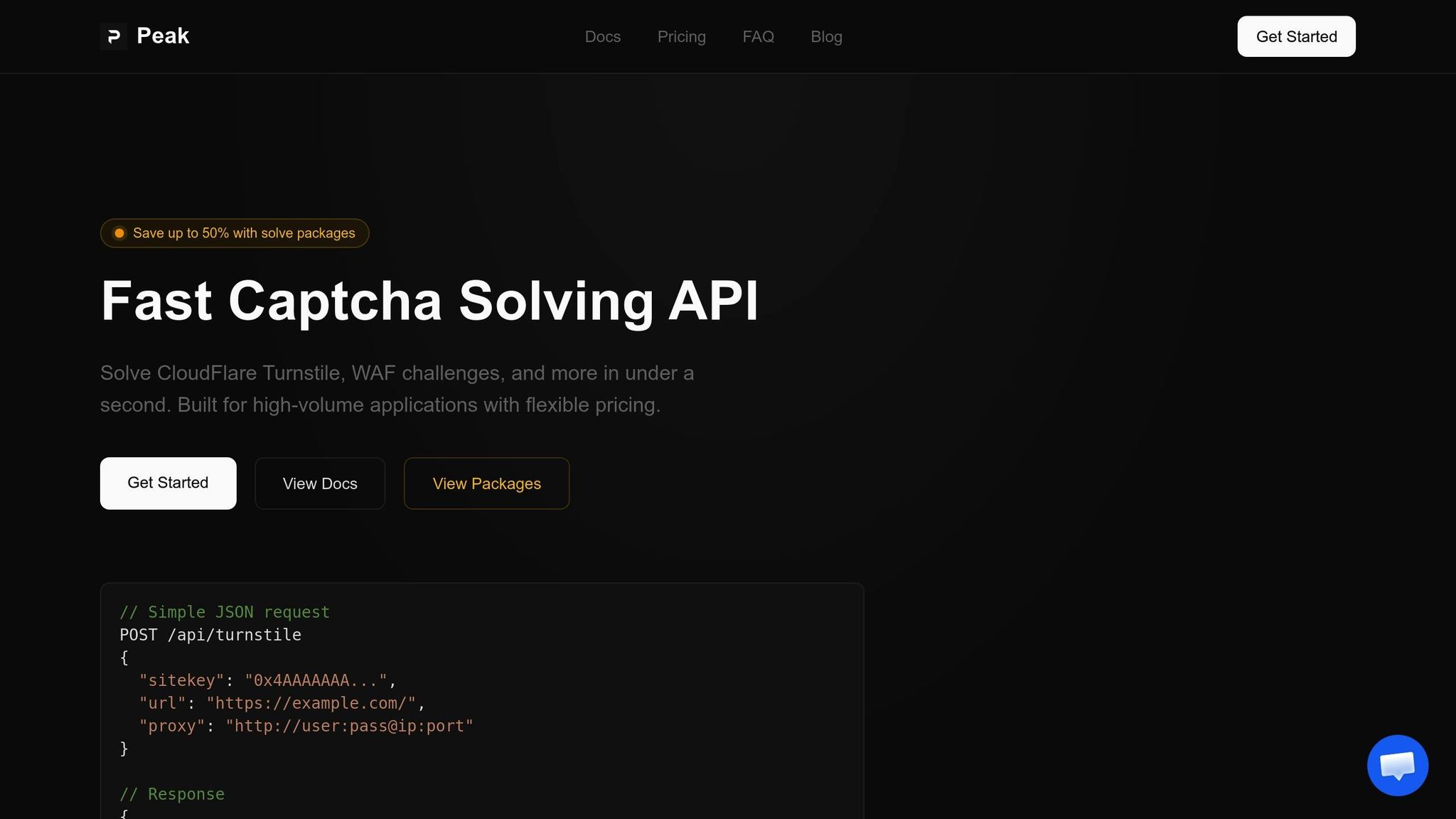
PeakFO is built for speed and reliability. It can solve CloudFlare Turnstile and WAF challenges in less than one second, boasting a success rate of over 99%. This speed is a game-changer for high-volume operations, where every second counts. The service also includes automatic retries and error handling, reducing failed requests and maximizing the efficiency of your proxy setup.
Billing is flexible, catering to different needs. Smaller operations can choose pay-per-solve pricing, while bulk packages - offering up to 50% savings - are ideal for high-volume users. For example, solving 1 million Turnstile challenges costs $500.00 with a bulk package, far less than standard rates. Integration is straightforward: simply pass your geolocation proxy details to the PeakFO API when submitting a solve request. This ensures the solution token is tied to the same IP that will handle subsequent requests, preserving session consistency required by modern anti-bot systems.
Scaling and Cost Management for High-Volume Applications
Beyond its technical strengths, PeakFO offers notable cost advantages. Teams using high-trust residential proxies can reduce blocked sessions by up to 60% within just two weeks. Fewer blocks mean fewer CAPTCHA challenges, translating to lower solving costs.
By combining session-preserving geolocation proxies with PeakFO, CAPTCHA triggers can drop from 42% to just 5%. For 100,000 daily requests, this change could save around $18.50 per day at bulk Turnstile rates ($0.50 per 1,000 solves). Over a month, that’s about $555.00 in savings - enough to balance the cost of premium residential proxies.
| Metric | Standard Rotating Proxy | Geolocation Proxy + PeakFO |
|---|---|---|
| Verification Rate | 42% | 5% |
| Success Rate | ~58% | 99%+ |
| Solve Speed | Variable/Manual | < 1 second |
| Cost Efficiency | High waste from blocks | Up to 50% savings via bulk |
PeakFO’s ability to scale without limits ensures consistent performance regardless of the volume. Whether you're handling hundreds or millions of requests, the service processes thousands of solves per minute without hitting rate caps. This makes it a dependable solution as your operations grow.
Conclusion: Key Strategies for CloudFlare Bypassing
Getting around CloudFlare's defenses in 2026 takes a careful and layered approach. The combination of high-trust mobile or residential proxies with fast CAPTCHA solvers is essential. Mobile proxies, in particular, shine with success rates between 92–97%, thanks to Carrier-Grade NAT (CGNAT). This technology hides individual users behind thousands of shared IPs, making it harder for CloudFlare to block them. As Proxies.sx puts it:
"Cloudflare cannot block a mobile carrier IP without blocking thousands of legitimate customers. This gives mobile proxy traffic an inherent 'diplomatic immunity.'" – Proxies.sx
To maintain session consistency, ensure your cf_clearance token is always paired with the same proxy IP, User-Agent, TLS fingerprint, and headers. Any mismatch can trigger detection instantly. Additionally, align your browser's settings, like geolocation, with the proxy's location to avoid raising red flags.
For solving challenges quickly, tools like PeakFO excel. They handle CloudFlare Turnstile and WAF challenges in under one second, boasting a success rate of over 99%. For high-volume needs, bulk packages can cut costs significantly, reducing Turnstile solves to as low as $0.50 per 1,000. This speed is critical, especially since CloudFlare blocks around 50 billion malicious requests daily.
Finally, mimicking authentic user behavior is crucial. CloudFlare's modern detection methods go beyond IP addresses, analyzing details like TLS fingerprints, HTTP/2 priority weights, and JavaScript execution timing. Automation tools must replicate browser signatures (e.g., Chrome 120) and introduce random delays of 2–5 seconds to avoid triggering behavioral analysis systems.
FAQs
What needs to match between my proxy location and browser settings?
To make location-based services and challenge responses function correctly, your proxy location needs to match your browser's geolocation. This alignment is usually done by using IP addresses or geohashes that correspond to the same geographic area.
When should I use sticky sessions instead of rotating proxies?
When maintaining session continuity is critical - like with account logins, multi-step checkouts, or session-based authentication - sticky sessions are the way to go. They ensure that all requests in a session come from the same IP, preserving the necessary context.
On the other hand, rotating proxies are ideal for tasks such as large-scale scraping or data collection. These activities don’t rely on session consistency, so rotating proxies distribute requests across multiple IPs. This approach helps avoid rate limits and reduces the risk of detection.
How do I keep CloudFlare cookies (like cf_clearance) valid when using PeakFO?
To ensure the cf_clearance cookie stays active with PeakFO, make sure to refresh it before it expires - usually within 30 to 60 minutes. You can automate this process by solving challenges periodically and saving the updated cookie. Using consistent browser fingerprints and IP addresses also helps keep the cookie valid. Thanks to PeakFO’s fast API, updating cookies is quick and reliable, allowing uninterrupted access to content protected by Cloudflare.