
High-Volume CAPTCHA Solving: Complete Setup Guide
Build a scalable CAPTCHA-solving system with API integration, proxy rotation, session persistence, human-like browser simulation, and performance monitoring.
High-volume CAPTCHA solving automates solving challenges like reCAPTCHA and Cloudflare Turnstile at scale, enabling smoother workflows for web scraping, automation, and data collection. This guide explains how to build a system that handles thousands of CAPTCHAs per hour, ensuring efficiency and avoiding detection by modern anti-bot systems.
Key Takeaways:
- Modern CAPTCHAs (e.g., reCAPTCHA v3, Cloudflare Turnstile) rely on behavioral analysis, device fingerprints, and network patterns to detect bots.
- Challenges include managing IP reputation, maintaining session consistency, and solving CAPTCHAs within short token expiration windows (90–120 seconds).
- Success depends on efficient API integration, proxy rotation, and simulating human-like behavior (e.g., natural mouse movements, realistic delays).
Quick Steps to Build Your System:
- Choose the Right API: Evaluate APIs based on speed, accuracy (95–99%), and scalability. Look for features like token-based solving and browser simulation.
- Integrate Effectively: Use task-based workflows to detect CAPTCHA types, create tasks, and retrieve solutions via API.
- Optimize Performance: Process CAPTCHAs asynchronously, track metrics like solve time and success rate, and rotate high-quality residential proxies.
- Avoid Detection: Match browser fingerprints, maintain session persistence, and replicate human-like navigation patterns.
Pro Tips:
- Use tools like Playwright or Puppeteer with stealth plugins to bypass detection.
- Monitor IP block rates and switch underperforming proxies.
- Leverage bulk pricing plans for predictable workloads to reduce costs.
Playwright Web Scraping + CAPTCHA Bypass Tutorial
CAPTCHA Types and Use Cases
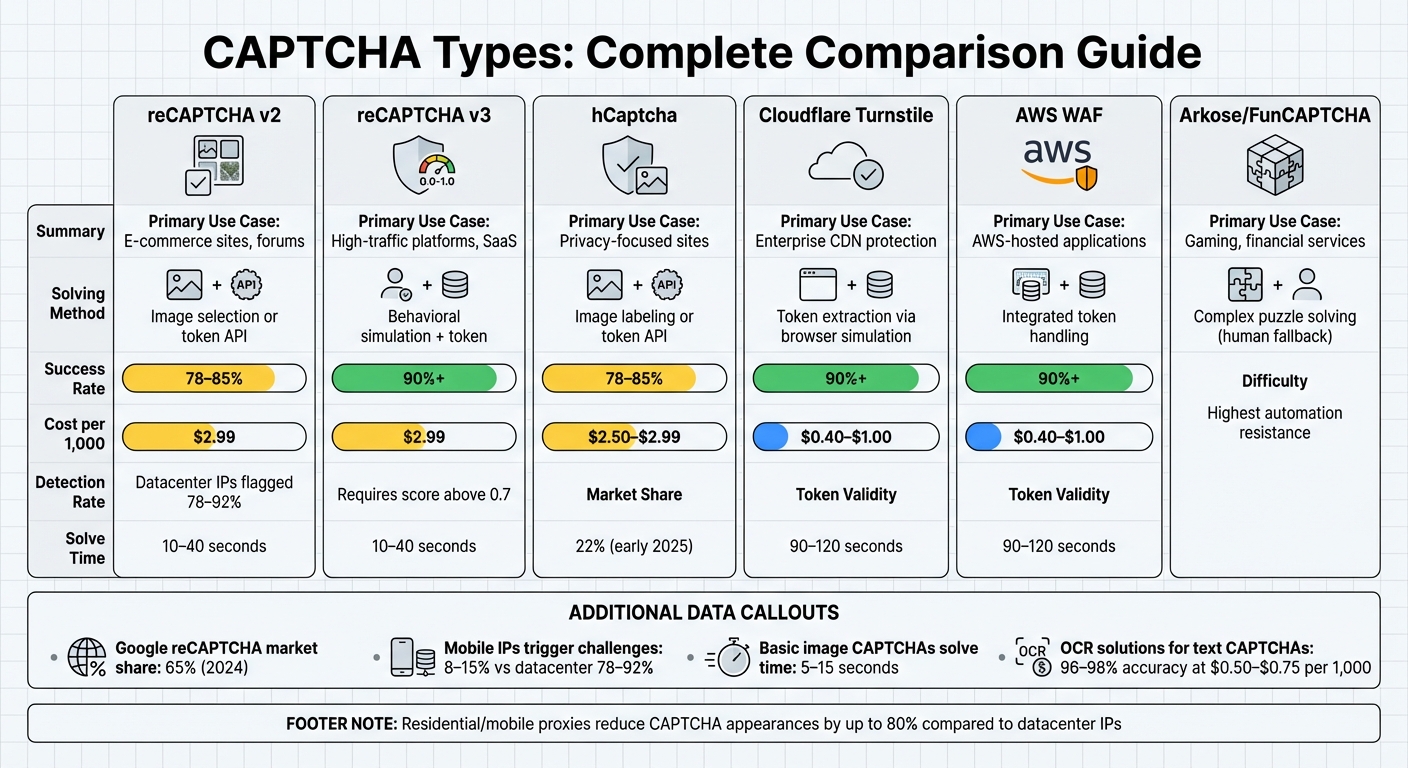
CAPTCHA Types Comparison: Success Rates, Costs, and Use Cases
Types of CAPTCHAs You'll Encounter
When managing high-volume operations, understanding the different CAPTCHA types is crucial for evaluating CAPTCHA solving API features and ensuring effective integration. CAPTCHAs have evolved from basic distorted text challenges to sophisticated invisible behavioral tests. Google reCAPTCHA leads the market, holding about 65% of the share as of 2024, with hCaptcha growing to nearly 22% adoption by early 2025.
- reCAPTCHA v2: This uses checkboxes or image grids to verify users. It requires moderate effort to bypass, often relying on vision-based machine learning or human solvers.
- reCAPTCHA v3: Operating invisibly, it assigns a risk score ranging from 0.0 (likely bot) to 1.0 (likely human) based on user behavior rather than active challenges.
- hCaptcha: Similar to reCAPTCHA v2 but with a focus on user privacy.
- Cloudflare Turnstile: A newer option that combines invisible proof-of-work and behavioral heuristics.
- AWS WAF: Integrated with Amazon's infrastructure, it uses token-based validation along with detection mechanisms.
- Arkose/FunCAPTCHA: This employs complex 3D puzzles and logic games, making it particularly difficult to automate.
The trend is shifting toward invisible verification. Modern systems rely on behavioral signals to differentiate humans from bots. For example, anti-bot systems can detect over 94% of headless browsers using TLS fingerprinting alone.
Choosing the right CAPTCHA type is essential for matching your automation goals with the security measures in place.
Matching CAPTCHA Types to Your Use Case
To maximize efficiency, align the CAPTCHA type with your specific automation scenario. Factors like the website's security protocols, your volume needs, and acceptable latency should guide your choice. The table below provides a quick reference for matching CAPTCHA types to various use cases:
| CAPTCHA Type | Primary Use Case | Solving Method | Typical Success Rate | Average Cost per 1,000 |
|---|---|---|---|---|
| reCAPTCHA v2 | E-commerce sites, forums | Image selection or token API | 78–85% | $2.99 |
| reCAPTCHA v3 | High-traffic platforms, SaaS | Behavioral simulation + token | 90%+ | $2.99 |
| hCaptcha | Privacy-focused sites | Image labeling or token API | 78–85% | $2.50–$2.99 |
| Cloudflare Turnstile | Enterprise CDN protection | Token extraction via browser simulation | 90%+ | $0.40–$1.00 |
| AWS WAF | AWS-hosted applications | Integrated token handling | 90%+ | $0.40–$1.00 |
| Arkose/FunCAPTCHA | Gaming, financial services | Complex puzzle solving (often requires human fallback) | - | - |
The type of IP you use can also affect CAPTCHA challenges. Datacenter IPs are flagged 78–92% of the time, while mobile IPs trigger challenges only 8–15% of the time. For operations targeting sites with reCAPTCHA v3 or Cloudflare Turnstile, residential or mobile proxies can reduce CAPTCHA appearances by up to 80%.
Token-based CAPTCHAs like Cloudflare Turnstile and AWS WAF require precise behavioral simulation and specialized endpoints. For older text-based CAPTCHAs, automated OCR solutions can achieve 96–98% accuracy at a lower cost, typically around $0.50–$0.75 per 1,000 challenges. In cases involving rare or especially tricky puzzles, human-in-the-loop services offer higher accuracy but may introduce delays, which can bottleneck high-volume workflows.
Choosing and Integrating CAPTCHA-Solving APIs
Now that we've covered CAPTCHA types and their use cases, let's dive into how to pick and integrate a high-volume CAPTCHA-solving API effectively.
How to Evaluate CAPTCHA-Solving APIs
When selecting an API, focus on speed, accuracy, scalability, and stability. Solve speed is critical - basic image CAPTCHAs typically take 5–15 seconds, while more complex ones like reCAPTCHA or FunCAPTCHA can range from 10–40 seconds. Aim for recognition accuracy between 95% and 99%; anything lower leads to retries and increased costs. For reCAPTCHA v2 and v3, some specialized solvers achieve success rates as high as 90%.
Scalability is another key factor. The API should handle thousands of simultaneous requests without performance drops. Some providers can process up to 12,000 image CAPTCHAs and 11,000 reCAPTCHA v2 challenges per minute. Stability matters just as much - look for uptime guarantees of 99.9% to avoid disruptions in your workflow.
Ease of integration is also important. Check for official SDKs in your preferred programming language, such as Python, JavaScript, or Go, and ensure the documentation is clear and thorough. Compatibility with standard protocols makes it easier to switch providers if needed. For large-scale scraping, ensure the API supports advanced features like browser fingerprinting, behavioral simulation, and token-based solving to mimic human interaction effectively.
Once you've evaluated your options, follow these steps to integrate your chosen API seamlessly.
API Integration Process
Start by detecting the CAPTCHA type and sitekey before making API calls. This can be done by analyzing HTTP status codes and page content, which helps minimize unnecessary costs. Next, create a task by sending a POST request to the solver's endpoint. Include your clientKey, websiteURL, and websiteKey in the request. The API will respond with a taskId.
Poll the API every 5 seconds to check if the solution is ready. For complex CAPTCHAs, allow up to 20 seconds before timing out, while standard image CAPTCHAs typically resolve in 5 seconds. Once the solution token is returned, insert it into the appropriate field (e.g., g-recaptcha-response) and submit the form. Ensure that the proxy IP used in your automation matches the one used by the solver, as mismatched IPs can lead to token rejection.
Here’s an example JSON payload for creating a task:
{
  "clientKey": "YOUR_API_KEY",
  "task": {
    "type": "RecaptchaV2Task",
    "websiteURL": "https://example.com",
    "websiteKey": "6Le-wvkSAAAAAPBMRTvw0Q4Muexq9bi0DJwx_mJ-"
  }
}
Mastering this process ensures a smooth integration experience. Now, let’s look at what PeakFO offers to enhance your CAPTCHA-solving capabilities.
PeakFO's CAPTCHA-Solving API Features
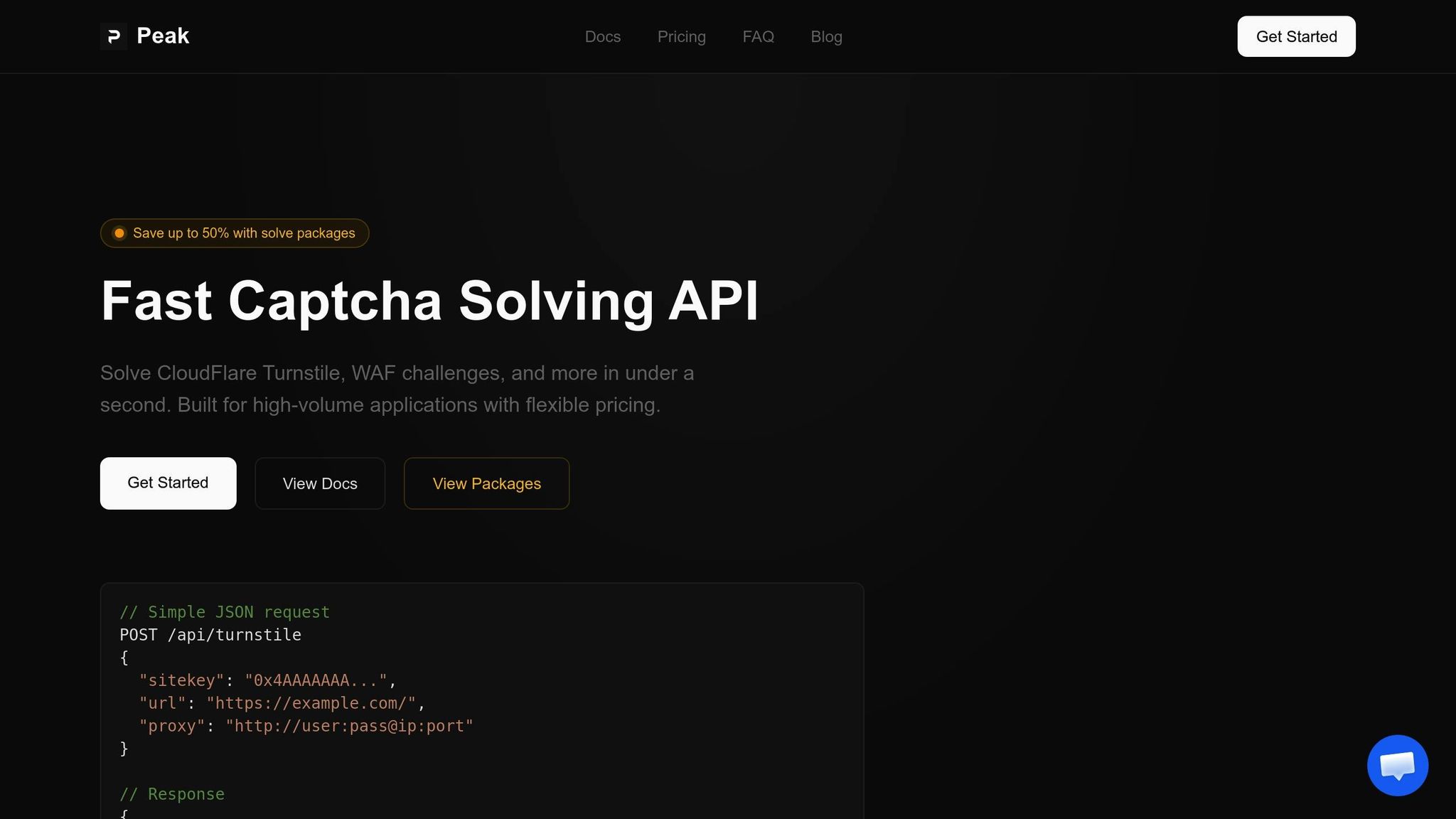
PeakFO stands out with its lightning-fast solve times, often under a second, and success rates exceeding 99%. The API supports challenges like Cloudflare Turnstile, Cloudflare WAF, and AWS WAF, all using a simple task creation and polling workflow.
Pricing is flexible to match your needs. You can opt for pay-per-solve plans or discounted bulk packages. For example:
- Cloudflare Turnstile packages: $35 to $500 (up to 50% discount)
- Cloudflare WAF packages: $45 to $700 (up to 42% discount)
- AWS WAF packages: $30 to $400 (up to 50% savings)
Each package includes a dedicated API key and remains valid for 30 days. Pay-per-solve plans have no balance expiration, making them ideal for variable workloads [website].
PeakFO also offers unlimited scalability, handling sudden traffic spikes without any performance degradation. You can monitor your usage programmatically through balance tracking via API. Plus, the straightforward integration process ensures you can get started in minutes using standard JSON payloads.
With these features, PeakFO provides a reliable and efficient solution for high-volume CAPTCHA-solving tasks.
Optimizing Performance for High-Volume Solving
Once you've integrated the API, the next step is to ensure your system can handle large-scale CAPTCHA solving efficiently. This means fine-tuning your setup to manage thousands of requests while keeping costs in check.
Scaling to Handle High Request Volumes
To handle high traffic, asynchronous processing is a must. Instead of solving CAPTCHAs one by one, use libraries like asyncio or aiohttp to process multiple tasks simultaneously without blocking your main thread. This approach minimizes bottlenecks and allows for concurrent operations.
For traffic spikes, implement a queueing system with tools like RabbitMQ, Kafka, or Redis. These tools help buffer incoming requests, ensuring your system processes them systematically rather than overloading and crashing. In distributed systems, Redis-based coordination can help maintain consistent rate limiting across multiple endpoints.
Maintaining IP and session consistency is also critical. The IP address used for your automation request must match the one used by the solver API, or the token will be invalidated. To avoid issues, rotate high-quality residential or mobile proxies instead of datacenter proxies, which are often flagged by anti-bot systems.
Finally, keep a close eye on these processes in real time to ensure smooth operation.
Tracking Performance Metrics
Real-time monitoring is essential for spotting and resolving issues quickly. Track key metrics like solve times, success rates, and cost per solve. Visualization tools like Grafana and Prometheus can help you monitor these stats and set up alerts for performance drops. Logging failure rates for specific proxy providers and monitoring HTTP 429 (rate-limiting) responses are also important. If a proxy pool consistently underperforms, consider switching providers or adjusting your rotation strategy.
For reCAPTCHA v3, keep an eye on the risk scores returned by the API. Scores above 0.7 are generally required for tokens to pass validation, so adjust your operations to maintain this threshold.
Lowering Costs While Maintaining Performance
Reducing costs without sacrificing performance requires smart optimizations. Deduplication is one way to save money - cache solutions for identical CAPTCHA challenges to avoid paying for repeated solves. For reCAPTCHA v3, filter out low-risk scores to skip unnecessary solves.
Be mindful of token expiration times, as they are only valid for 90–120 seconds. Request tokens only when they’re immediately needed.
Bulk pricing plans can also lower costs. If your workload is predictable, consider purchasing bulk packages for discounts. For fluctuating workloads, pay-per-solve plans with no balance expiration offer flexibility [website].
Lastly, use smart retry logic to improve efficiency. If a solve fails, retry up to three times, switching proxies or adding short delays between attempts as needed. For errors like ERROR_NO_SLOT_AVAILABLE, wait at least 5 seconds before retrying. For ERROR_ZERO_BALANCE, allow a 60-second timeout to top up your account.
Security and Detection Avoidance Practices
Handling high-volume CAPTCHA solving isn't just about speed; it's about staying unnoticed. Advanced anti-bot systems like Cloudflare Turnstile, Akamai, and DataDome evaluate over 300 behavioral indicators to distinguish bots from humans. These systems can process requests in under 2 milliseconds, so your approach needs to be airtight from the beginning.
Simulating Human Behavior
Anti-bot systems don’t just check if you solve a CAPTCHA correctly - they watch how you interact with the page. For example, mouse movements that are perfectly straight or clicks that happen instantly are red flags. To counter this, use Bézier curves to simulate natural, non-linear mouse paths with realistic acceleration and deceleration. Add random jitter and occasional pauses to mimic how humans naturally behave.
Timing is another critical factor. Introduce delays of 1–4 seconds between major actions to replicate decision-making or reading time. Avoid jumping straight to deep URLs like product pages; instead, navigate realistically - start at the homepage, browse categories, and then proceed to items. Scroll gradually with varying speeds, and occasionally scroll back up, just as a real user might.
Session persistence also plays a big role in avoiding detection. Reuse cookies and localStorage across requests to appear as a returning user instead of a new one. Tools like Playwright's StorageState API can help maintain these "warm sessions." Additionally, override automation-specific flags, such as setting navigator.webdriver to false, using stealth plugins like playwright-stealth to better mimic natural browser behavior.
"Avoiding bot detection with Playwright isn't about hiding automation - it's about making your tests behave like real users in real environments." - BrowserStack
Alongside simulating human interactions, staying consistent with technical signals is equally important.
Managing User Agents and IP Addresses
Your IP address and browser fingerprint must align and appear natural. For instance, using different IPs for separate actions can lead to token rejection. Residential or mobile proxies are better choices than datacenter IPs, which are flagged 78–92% of the time, compared to just 8–15% for mobile IPs.
"Sticky sessions" are another effective tactic. Stick with the same IP for 5–20 minutes or 20–40 pageviews to simulate realistic browsing behavior. Monitor success rates for each IP, and remove those with block rates exceeding 5–10% from your pool.
User-Agent strings must match the browser's actual TLS/JA3 fingerprint. For example, if your scraper claims to be Chrome but uses a Python library's TLS handshake, it’ll be flagged instantly. Tools like curl_cffi can help ensure your TLS signature matches that of real browsers. Keep all browser signals - including User-Agent, Accept-Language, screen resolution, WebGL, and fonts - consistent with the proxy's geographic location.
| Detection Pillar | What Gets Tracked |
|---|---|
| IP Reputation | ASN ownership, geographic consistency, request velocity, abuse history |
| Fingerprinting | Canvas/WebGL rendering, AudioContext, font enumeration, screen resolution |
| Behavioral | Mouse paths, scroll depth, keystroke dynamics, navigation flow |
| TLS/JA3 | Cipher suites, extensions, and protocol versions during handshake |
"A clean IP with a broken fingerprint will still be blocked. A perfect fingerprint with robotic timing will also fail." - Diego Asturias, RapidSeedbox
Deploying and Managing Your CAPTCHA-Solving Setup
Once you've optimized API integration and performance tracking, the next step is ensuring a solid deployment strategy. A well-managed production environment is crucial for handling high-volume CAPTCHA solving effectively. This section covers the essentials of deploying and managing your system, from container orchestration to resource scaling.
Deploying in production goes beyond basic docker run commands. While this approach works for testing, production systems require tools like Kubernetes, AWS ECS, Azure App Services, or at least Docker Compose for better orchestration. These tools provide critical features like persistent storage, automated recovery, and seamless scalability.
Using Containers for Deployment
To ensure your setup is resilient, start by creating persistent volumes with docker volume create. This preserves configuration files and cryptographic keys during restarts. Use .env files or environment variables to securely manage sensitive data like ADMIN_KEY, CORS_ORIGIN, and API secrets. Minimum requirements for your setup include 1GB of RAM, Ubuntu OS, and Docker Engine 20.10 or newer.
For large-scale operations, Multi-Model Serving (MMS) provides a more efficient alternative to single-model setups. MMS allows multiple models to run on shared infrastructure, reducing both costs and resource waste. Tools like KServe, Seldon Core, and NVIDIA Triton simplify this process by offering declarative, infrastructure-as-code frameworks. NVIDIA Triton, for example, can run multiple models simultaneously on a single GPU, maximizing hardware usage.
To further optimize, implement LRU caching, which unloads inactive models to free up memory. This approach, known as an "overcommit strategy", enables your system to handle more models than your physical RAM can store. Additionally, KServe's integration with Knative allows resources to scale down to zero when no CAPTCHA requests are active, cutting costs without compromising availability.
| Feature | Single-Model Serving | Multi-Model Serving (MMS) |
|---|---|---|
| Resource Efficiency | Low; reserves dedicated CPU/GPU per model | High; shares resources across multiple models |
| Scalability | Limited by orchestrator pod limits | High; supports hundreds of models per node |
| Cold Start Latency | High (minutes to start containers) | Low (seconds to load models) |
| Management | Coarse-grained (container level) | Fine-grained (model level) |
Next, let’s dive into cloud-based deployment strategies for scalability and security.
Cloud Platform Setup
For most setups, Docker Compose offers a straightforward deployment solution with simple update and rollback capabilities. However, enterprise-scale operations benefit more from Kubernetes, which delivers high availability, built-in load balancing, and global scalability. Cloud providers like AWS, Google Cloud, and Azure further enhance reliability with integrated WAF layers and multi-region support.
Always enable HTTPS for secure communication. Use tools like Certbot for Let's Encrypt certificates or Cloudflare Tunnels for systems behind firewalls. Reverse proxies such as Nginx, Apache, or Traefik can handle HTTPS termination, security headers, and large file uploads (set client_max_body_size to at least 2000M). For setups handling over 2,000 requests per second, offload rate-limiting and logging to external systems like Redis 7, PostgreSQL 15+, or ClickHouse. Redis, in particular, offers up to 8x faster performance compared to built-in database solutions.
Implement health check endpoints (e.g., /api/v1/health) so load balancers and uptime monitors can verify system status in real time. Schedule daily backups for critical data, including user databases and configuration files like settings.yml. To enhance security, rotate API secret keys regularly to minimize risks from accidental exposure.
With your cloud platform in place, the next step is configuring auto-scaling to handle fluctuating demand.
Configuring Auto-Scaling and Resources
Set resource limits (e.g., 4GB RAM, 2.0 CPUs) and reservations (e.g., 2GB RAM) to prevent crashes. Use Horizontal Pod Autoscaler (HPA) to dynamically adjust the number of Pod replicas based on metrics like CPU usage, memory, or request rates. Start conservatively, targeting CPU utilization around 70% and memory at 80% to handle sudden traffic spikes.
Vertical Pod Autoscaler (VPA) adjusts CPU and memory allocations for individual Pods, ensuring they are properly sized for their tasks. Meanwhile, Cluster Autoscaler (CA) manages infrastructure by adding or removing nodes when resources are insufficient. For CAPTCHA workloads, scaling based on metrics like queue length or active user sessions often works better than relying on CPU or memory alone.
"Effectively managing Kubernetes autoscaling for dynamic workloads is no longer optional; it's crucial for cost optimization and ensuring responsiveness." – Awanish Singh, CTO, Amar Ujala
In February 2026, Awanish Singh shared how his team managed a 500% traffic surge while cutting infrastructure costs by 40%. They achieved this by implementing multi-AZ cloud architectures, automated failover strategies, and Kubernetes-based orchestration. Singh also reduced cloud expenses for Redcliffe Labs by 30% through architecture audits and automated scaling.
To maintain availability during disruptions, use Pod Disruption Budgets (PDBs) to ensure a minimum number of instances stay online during maintenance or scaling events. Make sure Pods finish active tasks before shutting down to avoid pipeline interruptions. Enable dynamic batching in your inference server to group multiple requests into a single processing cycle, significantly boosting GPU throughput.
Finally, synchronize automation pipelines to request tokens only when needed, and ensure the proxy IP matches the one used for CAPTCHA solving to prevent token rejections. For most workloads, adding RAM beyond 16GB offers little performance gain.
Conclusion
Creating a high-volume CAPTCHA-solving system requires more than just integrating an API. Success hinges on tackling modern behavioral challenges and maintaining a strong IP reputation. By using specialized solvers that handle browser fingerprinting, token management, and human-like behavior simulation, it's possible to achieve success rates exceeding 90%.
Setup Steps Summary
Start by identifying the CAPTCHA types you’ll encounter, such as reCAPTCHA v3 with its invisible scoring system or other behavior-based challenges. Then, integrate a specialized API using a straightforward workflow: create a task with the target URL and site key, poll for the result, and inject the token within its 90- to 120-second validity window. For optimal results, use task-specific endpoints like TurnstileTask or AwsWafTask to fine-tune the solving process. These steps form the backbone of a scalable and efficient system.
Tips for Long-Term Success
Beyond the initial setup, maintaining a robust system requires ongoing optimization. Track key metrics like detection rates, accuracy, and latency to adapt quickly to evolving anti-bot measures. Use conditional triggers to activate solvers only when CAPTCHAs are detected. Incorporate smart retries with exponential backoff (up to three attempts) for failed solves, and rotate high-quality residential or mobile proxies to safeguard IP reputation.
Align browser fingerprints with your hardware profile by matching User-Agent, WebGL, Canvas, and TLS/JA3 settings. As Ethan Collins, a specialist in pattern recognition, explains:
"Modern CAPTCHAs are not just image puzzles; they are behavioral security checks."
FAQs
How do I keep the solver IP and my browser session on the same proxy?
To make sure the solver IP aligns with your browser session's proxy, adjust your proxy settings so that both the CAPTCHA solver and your browser operate under the same IP. This usually means linking the proxy to your CAPTCHA-solving tool or API and configuring it in your browser or API requests. Keeping the proxy consistent helps maintain session alignment and reduces the risk of detection.
What’s the best way to handle CAPTCHA tokens expiring in 90–120 seconds?
To handle CAPTCHA tokens that expire within 90–120 seconds, implement a system that proactively refreshes or retrieves a new token before the existing one runs out. This approach ensures smooth automation and keeps workflows running without interruptions.
What metrics should I monitor to catch issues before success rates drop?
Monitoring reCAPTCHA metrics such as key provisioning failures and authentication failures is essential. These metrics act as early warning signs, helping you spot potential issues before they escalate. By keeping an eye on these indicators, you can maintain stable success rates and tackle performance challenges quickly.