
Pay-Per-Solve vs Bulk Pricing: Which Saves More?
Compare pay-per-solve vs prepaid bulk CAPTCHA pricing, find break-even volumes, and choose the most cost-effective option for low to high monthly usage.

When choosing between Pay-Per-Solve and Bulk Pricing for managing CAPTCHA-solving costs, the right option depends on your monthly volume:
- Pay-Per-Solve: Best for low or irregular usage (under 10,000 solves/month). You only pay for completed solves, with no upfront costs or expirations. Ideal for small projects or unpredictable needs.
- Bulk Pricing: Designed for high-volume, consistent usage (10,000+ solves/month). Prepaid packages offer steep discounts (up to 71% savings) but require upfront payment and expire in 30 days. Great for large-scale operations.
Quick Comparison
| Criteria | Pay-Per-Solve | Bulk Pricing |
|---|---|---|
| Cost per 1,000 solves | $0.30–$3.00 | As low as $0.40 (with discounts) |
| Upfront Payment | None | Required |
| Expiration | None | 30 days |
| Best For | Low or sporadic volumes | High, consistent volumes |
| Savings Potential | Limited | Up to 71% |
For small-scale projects, Pay-Per-Solve is simple and flexible. For larger operations, Bulk Pricing can cut costs significantly, but only if your usage is steady. Monitor your CAPTCHA volume and calculate your success rate to find the best fit for your needs.
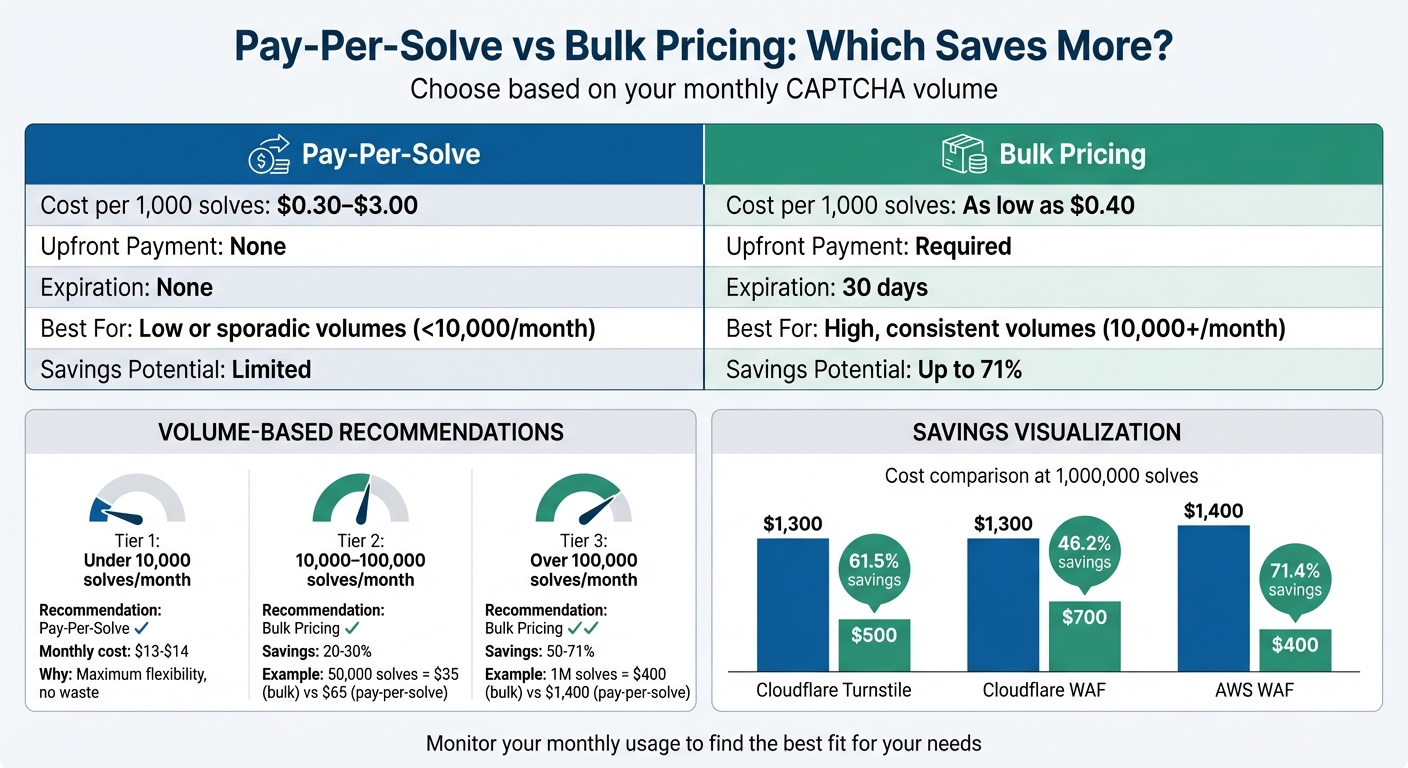
Pay-Per-Solve vs Bulk Pricing Cost Comparison by Volume
Pay-Per-Solve: How It Works
Pay-Per-Solve is as simple as it sounds: you’re only charged when a CAPTCHA is successfully solved. No fees for failed attempts or unsolved cases. At PeakFO, you load funds into your account, and each successful solve deducts from your balance. The best part? Your funds never expire.
There’s no need for upfront commitments, subscriptions, or minimum usage. You pay solely for what you use. Pricing and billing are straightforward: solving simple image CAPTCHAs costs as little as $0.0003 per solve (that’s $0.30 for 1,000 solves), while reCAPTCHA v2 challenges range from $0.001 to $0.003 per solve ($1.00 to $3.00 for 1,000).
Benefits of Pay-Per-Solve
What makes Pay-Per-Solve appealing is its flexibility, especially for workloads that are unpredictable. Whether you’re running QA scripts, testing automation, or managing occasional traffic spikes, you’re only billed for successfully solved CAPTCHAs. For developers handling smaller volumes - say 100 to 500 CAPTCHAs per month - the costs remain minimal.
Another perk? No prepaid bundles mean no risk of unused credits going to waste. This makes it a great choice for one-off projects, seasonal campaigns, or any situation where your CAPTCHA volume isn’t consistent.
Drawbacks of Pay-Per-Solve
The downside? Higher costs when dealing with large volumes. If your monthly CAPTCHA usage climbs into the tens of thousands, Pay-Per-Solve can lose its cost efficiency compared to bulk pricing or subscription plans. Developer Alexander puts it simply:
"For small and medium loads, pay-as-you-go is fine. At tens of thousands per month, run numbers on bundles/unlimited."
Without volume discounts, the fixed rate applies no matter how much you use, which can mean missing out on savings for high-volume scenarios. Up next, we’ll dive into how Bulk Pricing can be a better fit for larger-scale operations.
Bulk Pricing: How It Works
Bulk pricing flips the script by letting you prepay for a package of CAPTCHA solves at a discounted rate. At PeakFO, these packages are tailored for businesses with consistent, high-volume needs - like daily web scraping, mass account registrations, or ongoing automation workflows.
Here’s how it works: you buy a prepaid package of solves, and in return, you get a dedicated API key to manage usage across your projects. However, there’s a catch - the balance expires after 30 days. This expiration period aligns with typical monthly business cycles and helps PeakFO manage server capacity more efficiently, which is how they’re able to offer discounts as steep as 50%. Packages start small, covering 5,000 solves, but scale all the way up to 100,000 solves for larger operations.
For example, if your operation burns through 10,000+ CAPTCHAs daily (roughly 300,000 per month), even a $1 savings per 1,000 solves can add up fast - around $300 in monthly savings. For high-volume users, this can make a big dent in operating costs compared to the pay-as-you-go model.
Benefits of Bulk Pricing
The main draw? Cost savings. With discounts reaching up to 50%, bulk pricing can slash your CAPTCHA-solving expenses significantly if you’re running large-scale operations.
Another perk is the dedicated API keys that come with these packages. These keys make it easier to track and manage usage across multiple projects or pipelines, whether you’re using tools like Puppeteer, Selenium, or custom-built scripts. Plus, there are no thread limits, so your workflows won’t slow down during heavy use.
Scalability is also a major advantage. Bulk packages are designed to handle high traffic without rate limits or throttling, ensuring smooth operations even during peak demand. The 30-day expiration period encourages efficient planning, so you can make the most of your prepaid solves.
Drawbacks of Bulk Pricing
The biggest downside? Upfront payment. Unlike pay-as-you-go models, bulk pricing requires you to commit funds in advance. This can be a challenge if your budget is tight or cash flow is unpredictable.
Another issue is the 30-day expiration. If your CAPTCHA needs fluctuate - say, due to a slow month or project delays - any unused credits will expire, leaving you out of pocket. As developer Alexander points out:
"At tens of thousands per month, run the numbers on bundles/unlimited"
- but only if your usage is steady.
Lastly, bulk pricing isn’t ideal for low or sporadic usage. If you’re solving just a few hundred CAPTCHAs here and there, buying thousands upfront doesn’t make financial sense. This model works best when you’re confident you’ll use the entire package within the 30-day window.
Cost Comparison: Pay-Per-Solve vs Bulk Pricing
Cost Comparison by Volume
As your usage grows, the cost dynamics between pay-per-solve and bulk pricing shift significantly, especially when considering AWS WAF vs Cloudflare WAF. Here's a breakdown of costs for a 1,000,000-solve bulk package:
| Challenge Type | Pay-Per-Solve Rate | 10,000 Solves | 100,000 Solves | 1,000,000 Solves | Bulk Package (1M) | Savings |
|---|---|---|---|---|---|---|
| Cloudflare Turnstile | $1.30/1,000 | $13.00 | $130.00 | $1,300.00 | $500.00 | 61.5% |
| Cloudflare WAF | $1.30/1,000 | $13.00 | $130.00 | $1,300.00 | $700.00 | 46.2% |
| AWS WAF | $1.40/1,000 | $14.00 | $140.00 | $1,400.00 | $400.00 | 71.4% |
PeakFO offers bulk packages tailored to different usage levels, making them particularly appealing as your operation scales. For smaller monthly volumes, entry-level bulk options - such as $35 for 50,000 solves (Cloudflare Turnstile) or $30 for 25,000 solves (AWS WAF) - can deliver substantial savings once you cross the break-even point.
For example, at 10,000 solves per month, pay-per-solve costs range from $13 to $14. At 100,000 solves, that jumps to $130–$140. However, with a million solves, pay-per-solve pricing could cost $1,300–$1,400, while bulk packages cut that down significantly, saving hundreds - or even thousands - of dollars.
This data shows how volume impacts costs and helps businesses decide on the most efficient pricing model.
When Bulk Pricing Becomes Cheaper
The point at which bulk pricing becomes more cost-effective depends on the challenge type and monthly solve volume. For higher-priced options like AWS WAF, bulk pricing starts to make sense at around 8,000–15,000 solves per month. For more standard challenges like Cloudflare Turnstile, the tipping point is closer to 25,000–30,000 solves.
Take AWS WAF as an example: priced at $1.40 per 1,000 solves, a $30 bulk package (covering 25,000 solves) breaks even at about 21,400 solves. Similarly, for Cloudflare Turnstile, which costs $1.30 per 1,000, the $35 bulk package (50,000 solves) becomes more economical at roughly 26,900 solves.
As monthly volumes climb, the savings grow exponentially. For instance, at 300,000 solves, pay-per-solve pricing for Cloudflare Turnstile would cost around $390, but bulk pricing could slash that to $200 or less. For businesses managing millions of solves, switching to bulk pricing can save thousands each month.
Understanding these break-even points is crucial for selecting the right pricing strategy based on your operational needs and monthly volumes.
Which Pricing Model to Choose
When deciding on the right pricing model, it all comes down to your monthly CAPTCHA volume. Here's a breakdown to help you make the best choice:
Low-Volume Usage (Under 10,000 Solves/Month)
If your monthly CAPTCHA usage is under 10,000 solves, pay-per-solve is the way to go. At this level, costs generally range between $13.00 and $14.00 per month for most challenge types. Subscriptions or bulk packages don’t make sense here, as the limited savings they offer are outweighed by the added complexity.
Pay-per-solve offers simplicity and flexibility. You avoid tying up funds in prepaid credits that might expire or committing to volumes you may not reach. For instance, if you only need 500 solves in a slow month, your costs would be as low as $0.65 to $0.70 - far less than the minimum spend required for bulk packages.
This model is perfect for QA testing, small-scale scraping projects, or businesses with unpredictable CAPTCHA needs. The flexibility of scaling up or down without worrying about unused credits makes pay-per-solve ideal for volumes under 10,000. However, as your usage grows, bulk pricing starts to make more sense.
Medium-Volume Usage (10,000–100,000 Solves/Month)
For those solving between 10,000 and 100,000 CAPTCHAs monthly, bulk pricing becomes a smarter choice. Savings in this range typically hover around 20% to 30% compared to pay-per-solve rates. For example, solving 50,000 CAPTCHAs at pay-per-solve rates for Cloudflare Turnstile would cost roughly $65.00. But with PeakFO's $35 bulk package, you could cut that cost nearly in half.
Once your usage consistently surpasses the pay-per-solve break-even point, the savings from bulk pricing become too good to ignore. For instance, at 75,000 solves, you could save about $45 each month - or $540 annually - by switching to bulk pricing.
This is the sweet spot where businesses should consider bulk prepaid packages. However, before committing, it’s wise to track your CAPTCHA usage over three to six months to confirm you’ll consistently exceed the break-even threshold. Once you start solving more than 100,000 CAPTCHAs monthly, the benefits of bulk pricing grow even more pronounced.
High-Volume Usage (Over 100,000 Solves/Month)
For businesses solving over 100,000 CAPTCHAs each month, bulk pricing becomes a game-changer. Savings in this range can reach 50% to 71%, depending on the challenge type. For example, solving 300,000 Cloudflare Turnstile CAPTCHAs would cost $390.00 with pay-per-solve pricing. But with bulk pricing, you could slash that cost to $200.00 or less, saving $190.00 monthly - or $2,280.00 annually.
The savings grow exponentially at even higher volumes. Solving 1,000,000 AWS WAF CAPTCHAs at pay-per-solve rates would cost $1,400.00. But PeakFO’s bulk package reduces that to just $400.00 - a massive 71.4% savings. At this scale, even small differences in unit costs can add up to substantial monthly savings.
For high-volume operations, a hybrid approach can also be effective. Use AI-driven bulk packages for common challenges like reCAPTCHA and Cloudflare Turnstile, which make up the bulk of your solves. Reserve more expensive options for complex challenges. This strategy can lower your overall costs while maintaining high success rates across different CAPTCHA types.
Conclusion
The cost structure you choose ultimately depends on your monthly solve volume. Each pricing model has a clear break-even point. For businesses handling fewer than 10,000 solves per month, pay-per-solve is a flexible option since you only pay for what you use. When your monthly volume falls between 10,000 and 100,000 solves, bulk pricing can help lower costs - provided your usage remains consistent. For operations exceeding 100,000 solves per month, bulk packages offer the most economical choice.
It's a good idea to monitor your monthly usage over time before committing to a specific pricing model. If your volume fluctuates, a pay-as-you-go plan ensures you’re not paying for unused capacity. On the other hand, if your usage is predictable, bulk pricing can lead to significant savings.
Peak Solutions makes it simple to switch between pricing models as your needs evolve. You can start with pay-per-solve for initial testing or small-scale projects, then move to bulk packages as your usage grows. For large-scale operations, a hybrid approach - leveraging cost-efficient AI for routine tasks while reserving specialized solutions for complex problems - can help you get the most out of your budget.
FAQs
How do I estimate my monthly solve volume?
To figure out your monthly solve volume, start by reviewing your application's usage trends and the frequency of CAPTCHA challenges. Dive into historical data or logs to calculate the average number of CAPTCHAs solved daily or weekly. Once you have that, multiply it by the number of days in a month. For instance, if your users solve around 3,000 CAPTCHAs each day, that adds up to roughly 90,000 solves in a month. This calculation can guide you in selecting the pricing model that offers the best value for your needs.
What happens if my bulk credits expire unused?
If you don't use your bulk credits before they expire, you might lose them, depending on the provider’s rules. Many providers set a specific time frame for using credits. It’s a good idea to check your service agreement to see how unused credits are managed and whether there’s an option for extensions or refunds.
Can I mix pay-per-solve and bulk pricing?
Yes, it's possible to use both pay-per-solve and bulk pricing models together, but this largely depends on your service provider's policies. Some platforms keep these options separate, while others might let you mix them based on your needs. Be sure to review your provider's terms to see if combining these pricing models is allowed and how they can work together.