
How to Scale CAPTCHA APIs with Load Balancing
Scale CAPTCHA APIs with load balancing: pick L4 vs L7, configure health checks and session affinity, enable autoscaling, TLS offload, caching and monitoring.

When handling high volumes of CAPTCHA requests, delays and failures can occur if your infrastructure isn't prepared. Load balancing solves this by distributing traffic across multiple servers, ensuring faster responses, reduced latency, and reliable performance. Here's what you need to know:
- Why it matters: Over 50% of internet traffic is automated bot traffic, causing unpredictable spikes in CAPTCHA requests.
- How it works: Load balancers route traffic to healthy servers and optimize resource use. They handle SSL/TLS decryption, monitor server health, and can cache up to 80% of requests to reduce backend strain.
- Key benefits: Faster processing, fault tolerance, session consistency, and cost savings. For instance, Cloudflare provides 50 ms latency for most users worldwide.
- Setup essentials: Use health checks, configure session affinity, and enable autoscaling to manage traffic surges. Choose between Application (Layer 7) or Network (Layer 4) Load Balancers based on your needs, ensuring you select a CAPTCHA solving API with key features like unlimited scaling.
Efficient load balancing ensures CAPTCHA APIs can handle traffic spikes while maintaining smooth operations. This guide breaks down the setup process, from choosing the right load balancer to implementing health checks and monitoring performance.
Scaling Load Balancers: How to Eliminate Bottlenecks & Handle Millions of Requests
What Is Load Balancing for CAPTCHA APIs
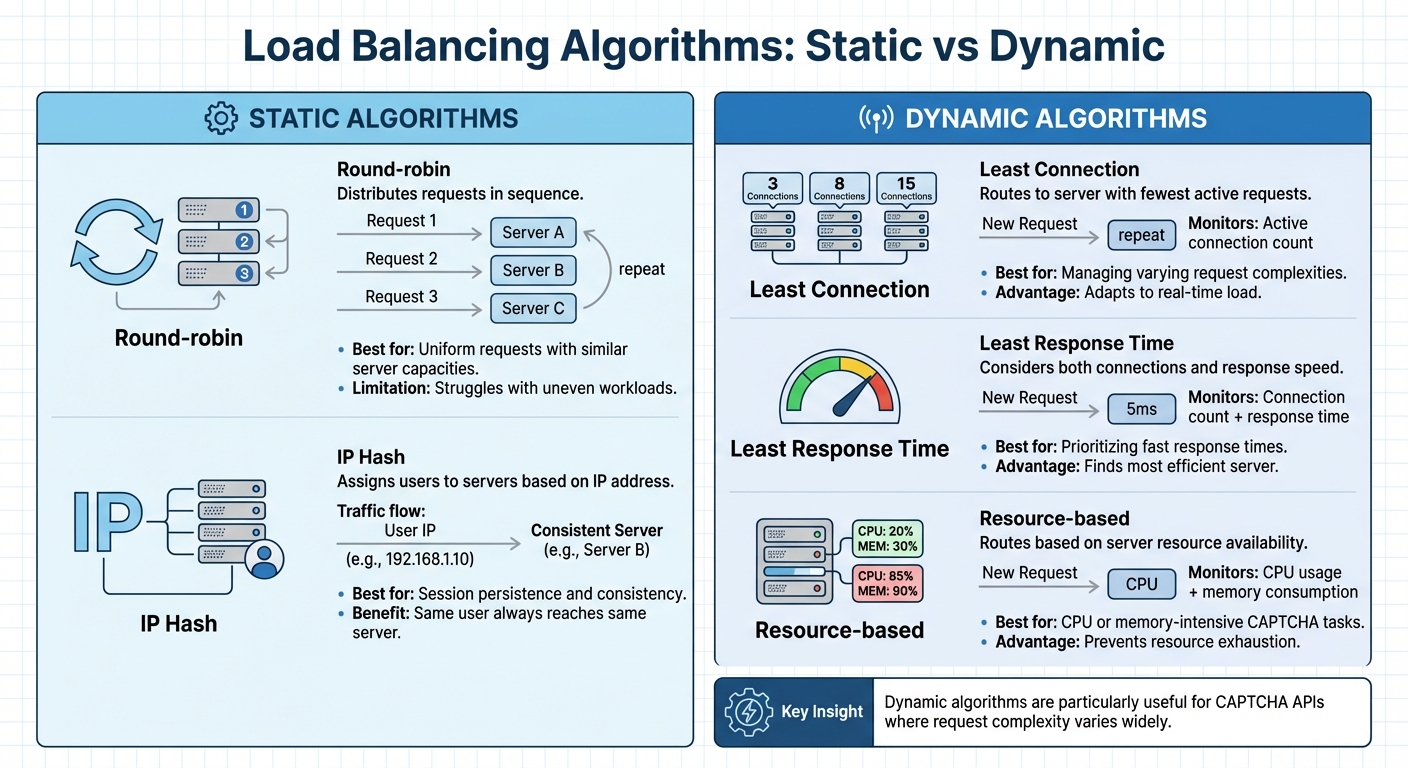
Load Balancing Algorithms Comparison for CAPTCHA APIs
Let’s dive into how load balancing plays a key role in optimizing CAPTCHA API performance. In simple terms, load balancing distributes incoming traffic evenly across servers, preventing overload and ensuring applications run smoothly and reliably. This is especially important for CAPTCHA-solving APIs, which need to manage high volumes of requests quickly to avoid frustrating users with delays.
"A load balancer sits between the user and the server group and acts as an invisible facilitator, ensuring that all resource servers are used equally." - AWS
Here’s how it works: the load balancer receives CAPTCHA requests and routes them to available servers. For CAPTCHA services, this often happens at the Web Application Firewall (WAF) layer, where bot traffic is filtered before it even reaches your backend servers. This keeps your system focused on legitimate requests while reducing unnecessary strain.
Load balancers function at different network layers. Application Load Balancing (Layer 7) routes traffic based on request details - like HTTP headers or SSL session IDs - making it ideal for directing specific CAPTCHA tasks (e.g., simple token verifications vs. complex challenges) to the right servers. On the other hand, Network Load Balancing (Layer 4) focuses on IPs and transport protocols, delivering the speed and low latency that CAPTCHA APIs demand.
How Load Balancing Works
Load balancers use algorithms to decide which server handles each incoming request.
- Static algorithms follow preset patterns. For example, round-robin distributes requests in sequence - server A gets the first, server B the second, and so on. Another static method, IP Hash, assigns users to a specific server based on their IP address, ensuring session consistency. While straightforward, these methods can struggle with uneven workloads if some requests are more complex than others.
- Dynamic algorithms, on the other hand, adapt based on real-time server conditions. Least Connection sends traffic to the server handling the fewest active requests. Least Response Time factors in both connection counts and response speeds to find the most efficient server. Resource-based algorithms go even further, considering CPU and memory usage before routing. These dynamic methods are particularly useful for CAPTCHA APIs, where the complexity of requests can vary widely.
For instance, Google Cloud’s load balancing system uses a global network of Front Ends in over 80 locations, capable of managing millions of requests per second. Modern load balancers can scale instantly to handle sudden traffic spikes without requiring manual adjustments.
| Algorithm Type | Method | Use Case |
|---|---|---|
| Static | Round-robin | Uniform requests with similar server capacities |
| Static | IP Hash | Session persistence for consistent server mapping |
| Dynamic | Least Connection | Managing varying request complexities |
| Dynamic | Least Response Time | Prioritizing fast response times |
| Dynamic | Resource-based | Handling CPU or memory-intensive CAPTCHA tasks |
Benefits of Load Balancing for CAPTCHA APIs
Load balancing offers several practical benefits that directly address the challenges of high-volume CAPTCHA APIs.
Fault tolerance and automatic failover ensure traffic is rerouted away from unhealthy servers immediately. Load balancers continuously monitor server health, so if an instance becomes unresponsive, traffic is redirected without interruption. For example, in 2023, Code.org used AWS Application Load Balancers to handle a 400% traffic surge during global online coding events.
"Load balancing is the practice of distributing computational workloads between two or more computers... This reduces the strain on each server and makes the servers more efficient, speeding up performance and reducing latency." - Cloudflare
SSL/TLS offloading is another game-changer. By handling encryption tasks at the load balancer level, backend servers can focus entirely on solving CAPTCHA requests, improving both speed and throughput.
Geographic optimization through Global Server Load Balancing (GSLB) routes requests to the closest server, cutting down on round-trip times. This is critical for CAPTCHA APIs since even small delays can add up over multiple requests. For example, Terminix implemented AWS Gateway Load Balancers and achieved a 300% increase in system throughput.
Finally, cost efficiency comes into play. By optimizing resource use, load balancing can significantly reduce hosting expenses. Second Spectrum, for instance, used AWS Load Balancer Controller to manage containerized workloads, slashing hosting costs by 90%. For CAPTCHA APIs, this translates to faster processing and a smoother user experience without breaking the bank.
Preparing Your Infrastructure for Load Balancing
To keep CAPTCHA challenges running smoothly and quickly, your infrastructure needs to handle heavy traffic efficiently. This involves setting up multiple backend servers, running health checks, and implementing security measures to safeguard your API while ensuring seamless traffic flow.
Setting Up Backend Instances
Assign each backend server a unique identifier, host URL, and port (such as 80 for HTTP or 443 for HTTPS). This setup helps the load balancer direct traffic to the right server without confusion.
Health monitoring is key. Your load balancer should regularly check each backend's status using TCP or HTTP probes to confirm they're responsive. Recommended health check settings include: IntervalInSec=5, ConnectTimeoutInSec=10, and MaxFailures=5. This ensures users aren't routed to servers that are down or unresponsive.
Session affinity is another critical element. Configure your load balancer to maintain session persistence using client IP addresses or cookies. This way, users stay connected to the same backend server throughout their CAPTCHA challenge, preserving their session data.
Prepare for traffic surges by enabling autoscaling. Set CPU usage triggers between 70% and 90% to automatically add more instances during peak times. Another strategy is "Waterfall by Region" - use global load balancing to redirect overflow traffic to the nearest available region when your primary location hits capacity.
Once your backend instances are set up and monitored, the next step is to secure and scale your API traffic.
Configuring API Scalability and Security
After ensuring your backend is ready, focus on securing your API operations. Start by integrating your CAPTCHA service at the Web Application Firewall (WAF) layer. Tools like Google Cloud Armor can block malicious traffic at the network edge, keeping it from reaching your backend servers.
Restrict traffic to authorized sources only. For instance, Google Cloud uses specific IP ranges (130.211.0.0/22 and 35.191.0.0/16) for health check probes and load balancer frontends. This prevents attackers from bypassing your load balancer and accessing backend servers directly.
Implement rate limiting to manage traffic effectively. Use a two-tiered approach: set a higher limit to block obvious abuse and a lower threshold to trigger CAPTCHA challenges for suspicious activity.
A practical example comes from GoFundMe. In 2024, they adopted reCAPTCHA Enterprise to tackle financial fraud and fake accounts. Matthew Murray, Director of Risk at GoFundMe, highlighted its success:
"Combining Google's rich security expertise with GoFundMe's focus on fraud prevention is already showing promising results as we strive to keep our platform the safest place to give online".
For CAPTCHA-specific setups, ensure your API keys are correctly integrated according to the documentation. If you're using reCAPTCHA, configure your SiteKey and SecretKey, and set a scoreThreshold (commonly 0.5 for v3 assessments). This helps fine-tune the CAPTCHA's sensitivity to suspicious behavior.
Setting Up a Load Balancer for CAPTCHA APIs
Now it’s time to configure the load balancer. This step ensures that CAPTCHA traffic is directed only to servers that are responsive and ready to handle requests. By selecting the right type of load balancer and setting up health checks, you can ensure smooth and efficient traffic management.
Choosing a Load Balancer Type
For CAPTCHA-solving APIs, Application Load Balancers (Layer 7) are often the go-to choice. They are designed to handle HTTP and HTTPS traffic, making them ideal for advanced routing needs. You can route traffic based on URL paths, host headers, or query parameters, which is especially useful for directing different types of CAPTCHA requests to specific backend servers.
On the other hand, Network Load Balancers (Layer 4) are better suited for scenarios where raw TCP or UDP traffic needs to be processed quickly or when maintaining the original client IP address is critical. Since these operate at the transport layer, they minimize processing overhead, making them a great fit for high-performance needs.
The choice between these two can have a noticeable impact on performance. For example, using an Application Load Balancer with persistent connections can reduce the Time to First Byte (TTFB) from 230 ms to 123 ms for cross-continental traffic. For global CAPTCHA APIs, a global load balancer with a single anycast IP address can terminate connections at the network edge closest to each user, further improving response times.
| Feature | Application Load Balancer (L7) | Network Load Balancer (L4) |
|---|---|---|
| Protocol Support | HTTP, HTTPS, HTTP/2, HTTP/3 | TCP, UDP, ESP, GRE, ICMP |
| Routing Logic | Path, Host, Headers, Query Params | IP, Port, Protocol |
| Optimal Use | Web APIs and Microservices | High-throughput, low-level protocols |
| Security | Integrated WAF/DDoS (e.g., AWS WAF) | Advanced Network DDoS protection |
For CAPTCHA APIs that rely on services like CloudFlare Turnstile, CloudFlare WAF, or AWS WAF, Application Load Balancers are particularly helpful. They offer HTTP-level features that enable sub-second solve times. Additionally, using SSL offloading can significantly reduce the CPU load on backend servers.
For high-traffic CAPTCHA services, such as PeakFO (https://peak.fo), implementing these load balancing strategies ensures reliable performance even during peak demand periods.
Configuring Health Checks and Session Affinity
Health checks are crucial for ensuring that only healthy servers handle traffic. These checks verify that your API is responsive and ready to process requests. For HTTP-based APIs, configure health checks to expect a 200 (OK) response. Redirect responses like 301 or 302 are flagged as unhealthy. A typical setup involves:
- A 5-second check interval.
- A 5-second timeout.
- Marking a backend healthy after 2 consecutive successful checks.
- Marking a backend unhealthy after 2 consecutive failures.
To ensure the success of these checks, set up ingress firewall rules for Google Cloud’s health check IP ranges (35.191.0.0/16 and 130.211.0.0/22).
Session affinity is another important configuration, especially for multi-step CAPTCHA processes. It ensures that repeated requests from the same client are routed to the same backend. Using CLIENT_IP (based on 2-tuple hashing) is a good approach for maintaining session consistency, even if the protocol or port changes.
| Session Affinity Type | Hashing Method | Best Use Case |
|---|---|---|
| NONE (Default) | 5-tuple (Source/Dest IP, Ports, Protocol) | Evenly distributing traffic across multiple servers |
| CLIENT_IP_PROTO | 3-tuple (Source/Dest IP, Protocol) | Keeping client sessions consistent for the same protocol |
| CLIENT_IP | 2-tuple (Source/Dest IP) | Maintaining session consistency regardless of protocol |
To further optimize, enable auto-capacity draining. This feature reduces backend capacity to zero if fewer than 25% of instances pass health checks. Once 35% or more instances are healthy for 60 seconds, capacity is automatically restored. This ensures the system remains stable even during failures.
Testing and Monitoring Your CAPTCHA API Performance
Once your load balancer is set up, the next step is to ensure it’s functioning as expected. Testing how traffic is distributed and keeping an eye on performance metrics can help you catch potential problems before they affect users.
Testing Traffic Distribution
To verify that requests are evenly distributed across your backend servers, simulate traffic. Tools like Nighthawk are particularly useful here, as they offer microsecond-level latency histograms, which are more detailed than Apache Benchmark's millisecond resolution. Use an open-loop pattern for testing - this means the load generator sends requests at a fixed rate, regardless of how quickly the server processes them. This method better reflects actual production traffic compared to closed-loop patterns.
Start small. Use a single virtual machine or Pod to test the service’s performance limits without being influenced by network or client-side bottlenecks. Then, introduce multiple clients to assess how session affinity impacts the distribution of requests.
Make sure your forwarding rules and proxy connections are routing traffic correctly. Also, check that the load balancer is selecting backends based on their health status, weights, and failover policies. During load tests, watch for "load-shedding" behavior, where the system may block some requests to preserve overall performance.
These tests ensure traffic is being distributed evenly, laying the groundwork for accurate performance monitoring.
Monitoring Performance Metrics
Once traffic distribution is verified, shift your focus to monitoring metrics to ensure the API maintains consistent performance. Two critical metrics to track are request throughput (measured in requests per second) and latency. Break latency into Backend Latency and Total Latency to identify where delays are occurring. Instead of relying on average latency, focus on the 99th percentile to understand the experience of users facing the longest delays.
Other key metrics include error rates, CPU and memory usage, and application-layer resource consumption. These can help you quickly identify and resolve overload issues. Calculate backend "fullness" using the formula currentUtilization / maxUtilization to determine if backends are nearing their capacity limits. As noted in Google Cloud Documentation:
"If a backend is running at a high utilization level... the load balancer avoids sending traffic to this backend. Generally, the load balancer tries to keep all backends running with roughly the same fullness".
Health checks are another essential monitoring tool. If the percentage of healthy endpoints drops below 70%, failover mechanisms typically activate, redirecting traffic to other backends or regions. For CAPTCHA APIs, which often have variable processing times, consider using custom metrics like queue depth instead of just requests per second to make smarter load-balancing decisions. Many modern load balancers support standards like Open Request Cost Aggregation (ORCA), which allows them to report custom metrics such as application_utilization and errors_per_second through HTTP response headers.
For high-traffic services like PeakFO (https://peak.fo), which handles challenges from AWS WAF vs Cloudflare WAF (including Turnstile) with sub-second solve times, monitoring these metrics is crucial. It ensures the system can maintain high success rates, even during times of peak demand.
Conclusion
Load balancing transforms CAPTCHA APIs into dependable, high-performing systems by evenly spreading traffic and conducting proactive health checks. This method boosts scalability to handle sudden traffic spikes and improves performance through smart routing algorithms.
But the work doesn’t stop with setting up a load balancer. Scaling is an ongoing effort. As Slava Shahoika, Head of Engineering at Vention, explains:
"Scaling APIs is an ongoing process. Once the issue is instantly resolved by allocating more resources, the next step is to analyze the application itself, the database queries, and other factors".
To maintain peak performance, continuous monitoring and optimization are essential. High-volume services like PeakFO (https://peak.fo), which achieves sub-second challenge resolution for tools like CloudFlare Turnstile, CloudFlare WAF, and AWS WAF, rely on these ongoing efforts to deliver 99%+ uptime even during peak demand. Practices like regular load testing and real-time observability using tools like Prometheus or Grafana are key. Additionally, smart caching strategies can cut API response times by up to 70% while trimming operational costs. These continuous improvements ensure the reliability and speed that platforms like PeakFO consistently provide.
FAQs
How do I choose between a Layer 7 and Layer 4 load balancer for a CAPTCHA API?
When deciding between Layer 7 and Layer 4 load balancers for a CAPTCHA API, it’s all about understanding what your application needs most.
- Layer 4 focuses on speed and efficiency. It’s perfect for high-throughput tasks, offering low-latency routing that can handle large volumes of traffic with minimal delay.
- Layer 7, on the other hand, brings more advanced features like content-aware routing and enhanced security options. This makes it a better fit for real-time CAPTCHA solving, where having more control over traffic is crucial.
Your choice boils down to priorities. If performance and scalability are at the top of your list, Layer 4 might be the better option. But if security and detailed traffic management are more important, Layer 7 is the way to go.
What health check endpoint should my CAPTCHA API expose for reliable failover?
A health check endpoint is a must-have for your CAPTCHA API. It acts as a quick diagnostic tool, allowing systems like load balancers or monitoring platforms to regularly check the service's status. When this endpoint is pinged, it should deliver a straightforward response - either success or failure - indicating whether the service is functioning as expected.
This setup ensures two critical things:
- Reliable Failover: If the service encounters issues, the health check can prompt the load balancer to reroute traffic to a backup system, minimizing downtime.
- Accurate Monitoring: By continuously verifying system health, potential problems can be identified and addressed before they escalate.
Incorporating this feature supports steady performance, even when the system is dealing with fluctuating traffic or unexpected challenges.
When should I enable session affinity for CAPTCHA challenges, and which type is best?
When you need to maintain a user's session state across multiple requests - like during login sessions or while managing shopping carts - it's crucial to enable session affinity. The best approach? Cookie-based affinity. This method uses cookies to ensure that all requests from the same client are consistently routed to the same endpoint, keeping the session intact.