
How to Solve Cloudflare Turnstile with API Integration
Guide to automating Cloudflare Turnstile solves: capture sitekey, request tokens via API, validate server-side, and handle errors.

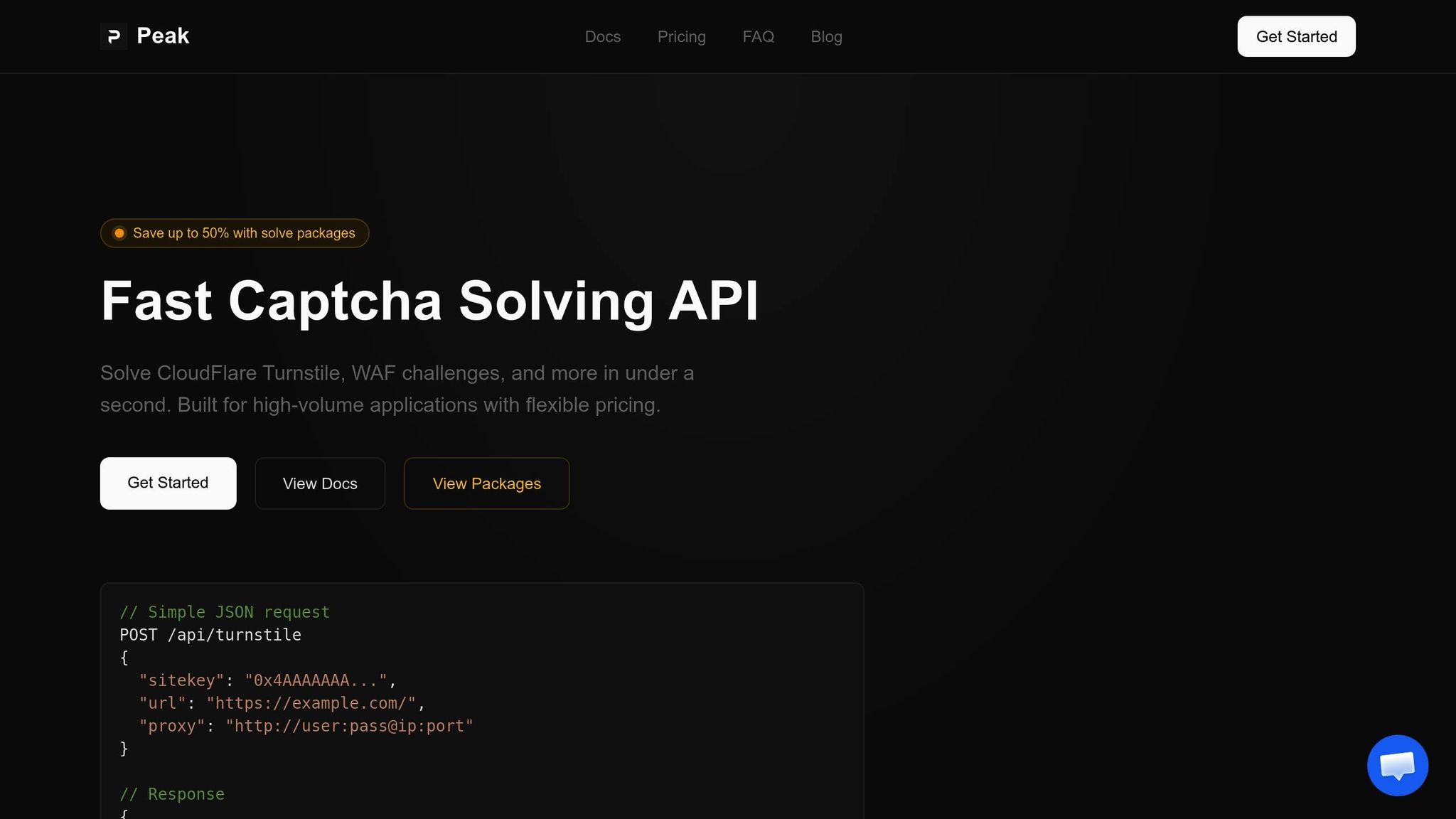
Cloudflare Turnstile is a CAPTCHA alternative that verifies users through browser-based challenges instead of traditional image or text puzzles. It generates single-use tokens valid for 5 minutes, requiring server-side verification to ensure security. PeakFO provides an API that automates solving these challenges, offering fast response times and a high success rate.
Key Points:
- Turnstile uses browser signals to differentiate humans from bots.
- Tokens must be validated on the server using Cloudflare’s Siteverify API.
- PeakFO’s API can solve Turnstile challenges in under 1 second with a 99%+ success rate.
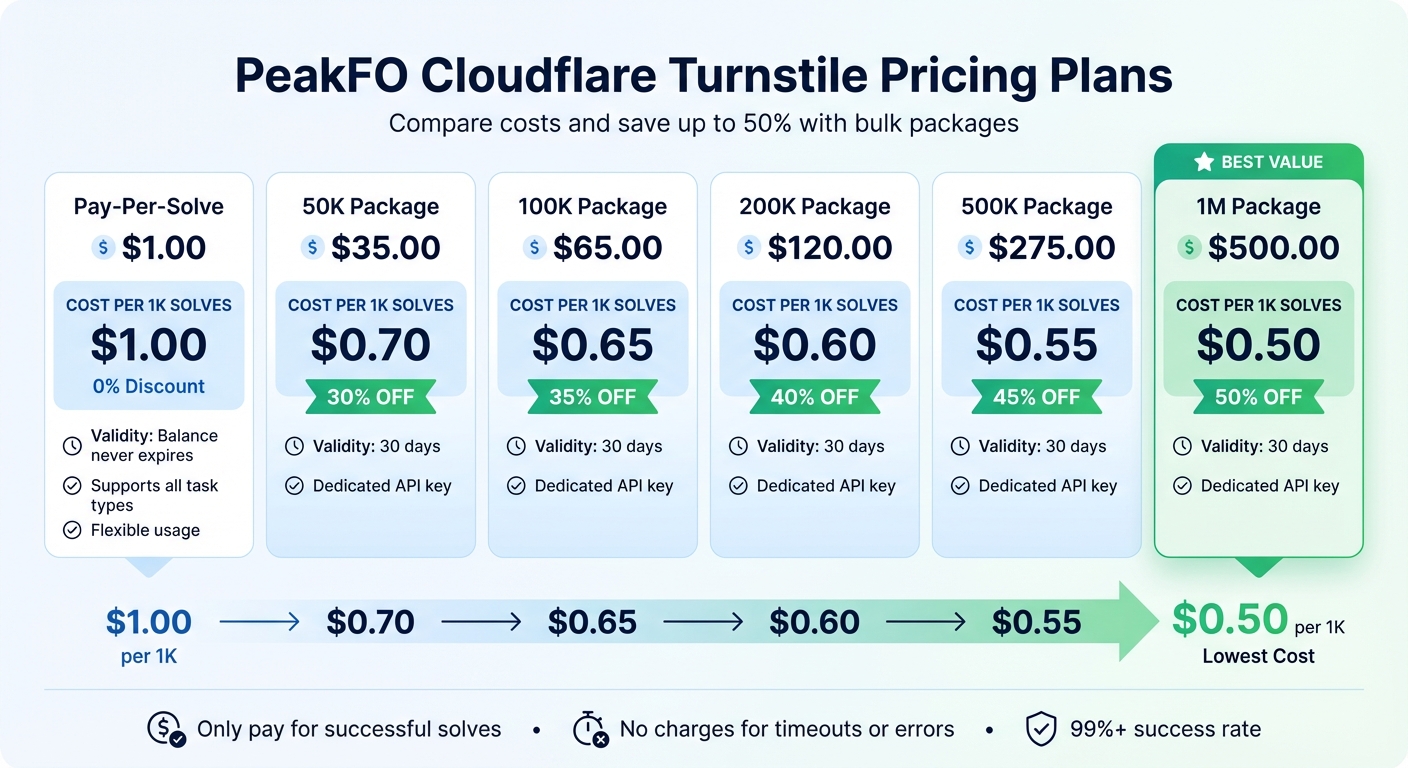
- Pricing starts at $1.00 per 1,000 solves, with discounts for bulk packages.
Steps for Integration:
- Use the PeakFO API to retrieve valid Turnstile tokens programmatically.
- Capture the
sitekeyand page URL from the target website. - Validate the token with Cloudflare’s Siteverify API to ensure legitimacy.
- Handle errors like expired or reused tokens by resetting the Turnstile widget.
With PeakFO, automating Turnstile CAPTCHA solving is efficient and cost-effective, making it ideal for high-demand workflows.
PeakFO CAPTCHA Solving API Overview
PeakFO Cloudflare Turnstile Pricing Plans Comparison
PeakFO's API is designed to retrieve valid Turnstile tokens programmatically, enabling fully automated workflows. Since these tokens are single-use and time-sensitive, speed and reliability are essential to avoid issues like timeout-or-duplicate errors.
PeakFO API Features and Advantages
The API boasts sub-second solving times - consistently under 1 second for all widget types. This ensures tokens are valid when needed, minimizing the risk of timeouts. PeakFO's infrastructure delivers a 99%+ success rate, supported by features like automatic retries and robust error handling. This means fewer disruptions from timeouts or proxy-related issues, and you'll only be charged for successful solves.
The API can handle thousands of solves per minute, making it scalable for high-demand use cases. Integration is straightforward: you send a simple JSON POST request with the required sitekey and url, with optional proxy support. Each response provides a valid Turnstile token ready for immediate use. Additionally, the /getbalance endpoint lets you track your usage, ensuring you always have enough solves available.
These features make the API a reliable and efficient solution for seamless integration into automated workflows.
Cloudflare Turnstile Pricing Plans
PeakFO offers flexible pricing to suit different needs, with two billing models: Pay-Per-Solve for flexibility and Solve Packages for discounted bulk usage. The standard rate starts at $1.00 per 1,000 successful solves, but higher-volume plans can cut costs by up to 50%.
| Plan Name | Price (USD) | Price per 1K Solves | Features & Limitations |
|---|---|---|---|
| Pay-Per-Solve | $1.00 | $1.00 | Balance never expires; supports all task types |
| 50K Package | $35.00 | $0.70 | 30% discount; expires in 30 days; dedicated API key |
| 100K Package | $65.00 | $0.65 | 35% discount; expires in 30 days; dedicated API key |
| 200K Package | $120.00 | $0.60 | 40% discount; expires in 30 days; dedicated API key |
| 500K Package | $275.00 | $0.55 | 45% discount; expires in 30 days; dedicated API key |
| 1M Package | $500.00 | $0.50 | 50% discount; expires in 30 days; dedicated API key |
The Pay-Per-Solve option is perfect for testing or fluctuating workloads because the balance never expires. For systems with steady demand, Solve Packages offer substantial savings, dropping the cost per 1,000 solves to as low as $0.50. These packages also come with a dedicated API key and are valid for 30 days.
PeakFO supports a variety of payment methods, including cryptocurrencies like BTC, LTC, ETH, USDT (TRC20/ERC20), and TON. Account management is handled through their official Telegram bot, making the process convenient and user-friendly.
With its performance-driven features and cost-efficient pricing, integrating Turnstile CAPTCHA solving into your operations is simple and effective.
How to Integrate the API for Turnstile CAPTCHA Solving
Getting Your PeakFO API Credentials
To get started, open the PeakFO Telegram bot. This bot handles everything from account creation to generating your API key. You’ll find the "API Keys" menu particularly useful for managing your keys and tracking your balance. Keep in mind that the minimum top-up amount is $5.00, and payments are accepted exclusively in cryptocurrencies.
Once you’ve got your API key, you can authenticate your requests using one of these header formats: X-API-Key: pk_your_api_key_here or Authorization: Bearer pk_your_api_key_here. If you decide to purchase a Solve Package, you’ll receive a dedicated API key tailored for that specific package. To keep an eye on your remaining credits, use the /getbalance endpoint as detailed in our API documentation before diving into high-volume tasks.
With your API key ready, the next step is capturing the Turnstile tokens on the client side.
Capturing Turnstile Tokens on the Client Side
Start by identifying the Turnstile challenge parameters on the target website. Add the Turnstile script to your HTML using the following code:
<script src="https://challenges.cloudflare.com/turnstile/v0/api.js" async defer></script>.
The widget can render in two ways:
- Implicitly: It scans for elements with the
cf-turnstileclass. - Explicitly: Use the
turnstile.render()function to control rendering programmatically.
Once the challenge is completed, Cloudflare generates a verification token. This token is accessible through a callback function or a hidden form field named cf-turnstile-response. Remember, the token is valid for 300 seconds and can only be used once. For automation purposes, extract the sitekey from the widget’s HTML attributes and grab the page URL where the challenge occurs - these two parameters are essential for the PeakFO API.
Here’s a quick comparison of rendering methods:
| Feature | Implicit Rendering | Explicit Rendering |
|---|---|---|
| Ease of Setup | Simple, minimal code | Requires additional JavaScript |
| Control over Timing | Renders automatically on page load | Full programmatic control |
| Ideal Use Case | Static content and simple forms | Dynamic content and SPAs |
| Customization | Limited to HTML data attributes | Extensive via JavaScript API |
Once you’ve captured these parameters, you’re ready to connect with the PeakFO API on the server side.
Connecting to PeakFO API on the Server Side
To solve the CAPTCHA, send a POST request to https://api.peak.fo/solve. Include your API key in the X-Api-Key header. The JSON request body should include the following:
"task": "turnstile"- A data object containing the
sitekeyandurl.
For added reliability, you can include a proxy parameter (http://user:pass@ip:port) to prevent IP mismatches that might lead to rejections by the target site.
The API will respond with a JSON object. Verify that "success": true before using the token from data.token. PeakFO boasts a response time of under one second, with a success rate exceeding 99%. The best part? You’re only charged for successful solves - any failed attempts, timeouts, or proxy errors won’t cost you a dime.
This wraps up the integration process, linking credential setup, client-side token capture, and server-side API interaction into one smooth workflow.
Validating Responses and Handling Errors
When you receive a PeakFO response, the first thing to do is check the success flag. A successful response will include "success": true, along with the solution token located in the data.token field. Make sure to confirm the success flag before attempting to access the token. Skipping this step could lead to null pointer errors or unnecessary processing.
The token you get from PeakFO isn’t the end of the process. You need to validate its legitimacy by submitting it to Cloudflare’s siteverify API at https://challenges.cloudflare.com/turnstile/v0/siteverify. This server-side validation step ensures the token is legitimate, as client-side success alone isn’t enough. To safeguard against duplicate submissions during retries, include an idempotency_key (UUID) in your validation requests.
Tokens are both time-sensitive and single-use, so handling errors properly is critical. If validation fails, Cloudflare provides an error-codes array. For example, the timeout-or-duplicate error occurs when a token has expired or been reused, while invalid-input-response signals a malformed token. In these cases, you’ll need to refresh the widget using turnstile.reset() to generate a new token.
| Error Code | Description | Action Required |
|---|---|---|
invalid-input-response |
Token is invalid or malformed | Prompt the user to retry the challenge |
timeout-or-duplicate |
Token expired (after 5 minutes) or reused | Generate a new token; avoid reusing tokens |
invalid-input-secret |
Secret key is incorrect | Verify the correct key in the Cloudflare dashboard |
missing-input-response |
Token parameter not included | Ensure the token is passed in the request |
For internal-error responses, implement a 10-second timeout and use exponential backoff to retry requests. One relief? PeakFO only charges for successful solves, so you won’t incur costs for failed attempts, timeouts, or proxy errors. Keep in mind that your Cloudflare secret key must NEVER appear in client-side code. Always handle validation exclusively on the server side.
Full Python Code Example for Turnstile CAPTCHA Solving
Here’s a Python script showing how to use the PeakFO API to solve Cloudflare Turnstile challenges with the requests library:
import requests
import os

# Configuration
API_KEY = os.environ.get('PEAKFO_API_KEY')  # Securely store your API key
PEAKFO_SOLVE_URL = 'https://api.peak.fo/solve'
TARGET_URL = 'https://example.com/login'  # Replace with your target URL
SITEKEY = '0x4AAAAAAABbXhKxYlYbMxYZ'  # Replace with the actual sitekey from the target site

def solve_turnstile(sitekey, url, proxy=None):
    """
    Sends a request to the PeakFO API to solve a Turnstile CAPTCHA.
    Returns the solution token if successful, or None if it fails.
    """
    headers = {
        'X-Api-Key': API_KEY,
        'Content-Type': 'application/json'
    }

    data = {
        'task': 'turnstile',
        'sitekey': sitekey,
        'url': url
    }

    if proxy:
        data['proxy'] = proxy  # Use proxy if provided (format: http://user:pass@ip:port)

    try:
        response = requests.post(PEAKFO_SOLVE_URL, json=data, headers=headers, timeout=30)
        response_json = response.json()

        if response_json.get('success'):
            token = response_json['data']['token']
            print(f"✓ Token received (length: {len(token)} chars)")
            return token
        else:
            print(f"✗ Solve failed: {response_json}")
            return None

    except requests.exceptions.RequestException as e:
        print(f"✗ Network error: {e}")
        return None

# Execute the solve request
print(f"Solving Turnstile for: {TARGET_URL}")
solution_token = solve_turnstile(SITEKEY, TARGET_URL)

if solution_token:
    print(f"\nToken ready for submission: {solution_token[:50]}...")
    # Submit this token to your target website's form field (e.g., 'cf-turnstile-response')
else:
    print("\nFailed to obtain token. Check API key and balance.")
This script demonstrates how to interact with the PeakFO API by sending a POST request to https://api.peak.fo/solve. It includes your API key in the X-Api-Key header and specifies the task as "turnstile" while providing the sitekey and the full url where the CAPTCHA is located. The API response contains a success flag and, if successful, the solution token is found in data.token.
To ensure smooth operation, validate the success field before using the token. Printing the sitekey and url values beforehand can help debug any issues with the input data. For security, always store your API key in environment variables.
Once the token is retrieved, it should be submitted to the target website’s form field, often named cf-turnstile-response. Note that the token is valid for 300 seconds (5 minutes). With PeakFO’s average solve time of less than a second and a success rate exceeding 99%, this approach is well-suited for handling high-volume automation tasks.
After obtaining the token, you can move forward to validate it and handle any potential errors in the next steps.
Testing and Optimizing Your CAPTCHA Automation
When testing your PeakFO integration, it's essential to follow a systematic approach across various environments. Start by using Cloudflare's dummy sitekeys during the development phase. These sitekeys produce predictable responses, making them perfect for testing. For instance, the sitekey 1x00000000000000000000AA always results in a successful response, letting you test form submissions without issues. On the other hand, 2x00000000000000000000AB always fails, which is helpful for verifying your error-handling processes. This step lays the groundwork for managing environments effectively and ensuring robust error handling.
After capturing tokens and integrating APIs, separate your testing and production environments. This practice is crucial for smooth operation. Store API keys and sitekeys securely in environment variables (e.g., .env files) for development, staging, and production. This not only safeguards live metrics but also helps maintain consistency. Additionally, your server-side validation must handle both success: true and success: false responses from the Siteverify API correctly.
Pay close attention to token lifecycles. Test scenarios where tokens expire or are reused, triggering errors like timeout-or-duplicate. Use exponential backoff for retries and set a 10-second timeout to prevent unnecessary delays. For added security, validate that the hostname and action fields in the API response align with your expected values. This ensures tokens cannot be reused across domains.
Once you've tested token lifecycle scenarios, focus on monitoring performance metrics. Effective token management goes hand in hand with tracking solve metrics. Keep an eye on "Challenges Issued" versus "Challenges Solved" in your analytics dashboard. A low solve rate could signal bot activity or a misconfiguration in your API setup. With PeakFO's average solve time under 1 second and a success rate exceeding 99%, your automation should perform reliably. Additionally, include the visitor's IP address using the remoteip parameter during validation to help Cloudflare improve its risk assessment.
For long-term security, regularly rotate your secret keys through the Cloudflare dashboard or API. To avoid retry errors, include an idempotency_key (UUID) in your Siteverify API calls. These measures ensure your CAPTCHA automation remains efficient, secure, and reliable over time.
Conclusion
Integrating PeakFO's API offers a streamlined solution to tackle Turnstile challenges in your web automation processes. With sub-second solve times and a success rate over 99%, it ensures your operations stay efficient and reliable. The setup is straightforward - just a simple JSON POST request - and you're ready to go, whether you're working on web scrapers, testing tools, or automating form submissions.
The success-based billing model means you only pay for successful solves. You won't be charged for failed attempts, timeouts, or proxy issues. Plus, bulk packages can cut costs by up to 50%, reducing rates to as low as $0.50 per 1,000 solves. This flexibility makes it easy to start small during testing and scale up as your needs grow.
PeakFO's API also delivers unlimited scalability, capable of handling thousands of solves per minute without restrictions - ideal for enterprise-level automation. Features like automatic retries and built-in error handling ensure smooth performance with minimal downtime. By integrating PeakFO, you enhance your automation workflow with speed, reliability, and cost-efficiency.
FAQs
How do I find the Turnstile sitekey on a webpage?
To find the Turnstile sitekey on a webpage, look at the HTML where the Turnstile widget is placed. The sitekey is stored in the data-sitekey attribute of the div element that renders the widget. For example:
<div class="cf-turnstile" data-sitekey="YOUR-SITE-KEY"></div>
You can use your browser's developer tools or inspect the page's source code to locate this element and extract the sitekey.
When should I use a proxy with the API?
When a CAPTCHA challenge requires the IP address solving the Turnstile to match the IP submitting the token, using a proxy with the API is a smart move. This approach helps ensure the target site accepts the response, as some sites check for consistency between these IPs. By adding a proxy parameter to your API request, you can boost your chances of success while minimizing the risk of detection or rejection caused by mismatched IPs.
How can I prevent timeout-or-duplicate token errors?
To prevent issues like timeout or duplicate token errors with Cloudflare Turnstile, make sure to validate tokens quickly, as they expire after 5 minutes. Each token should be used only once and discarded immediately after validation. If you face timeout errors, retry the validation process as needed. For invalid widget states, reset the widget before generating a new token. Following these steps will help maintain a seamless API integration process.